
Improper offboarding is a process failure rather than a platform failure. Google Cloud and Google Workspace give admins the controls to suspend accounts, revoke sessions and tokens, transfer file ownership, and archive data. Risk builds up when those steps are run manually, in an inconsistent order, or days after someone’s last day. Automating the sequence — and logging every action — is what makes offboarding repeatable and auditable.
What’s in this article
- Where Google’s responsibility ends and yours begins
- What the research says about offboarding gaps
- Documented cases of access that outlived employment
- What the exposure actually costs
- Where to go next
- The offboarding sequence for Google Workspace
- Download the offboarding checklist
- Automating the sequence with Zenphi
- Automated offboarding at 2,000 departures a month
- Video: revoke Drive access automatically
- FAQ
Google Cloud is a secure platform. Access lifecycle is still your process.
Google operates its infrastructure under a shared responsibility model. Google hardens the platform, encrypts data, and gives administrators a deep set of identity and access controls. Customers decide how those controls are used: which accounts exist, what each one can reach, and how quickly access is withdrawn when someone leaves.
That second half is where the gap usually sits. Onboarding has an obvious business owner and a deadline — a new hire cannot work without accounts. Offboarding has neither. The person is already gone, the ticket competes with live incidents, and the steps are spread across Google Admin, Drive, groups, third-party apps, and HR systems. Nothing visibly breaks when a step is missed, which is exactly why missed steps accumulate.
Employee offboarding and data archiving is the part of your IAM procedure that removes a departing employee’s access and preserves what the business needs to keep. Below is what happens when it runs late, partially, or from memory.
Google provides
- Infrastructure and platform security.
- Admin controls to suspend, delete, and archive accounts.
- Session, token, and app-password revocation.
- Drive ownership transfer and Vault retention.
- Audit logs of admin and user activity.
Your organization decides
- When offboarding is triggered and by whom.
- Which steps run, and in what order.
- Who receives files, mail, and group ownership.
- Which third-party OAuth grants are revoked.
- Whether the run is recorded for audit or compliance.
Most offboarding stops at paperwork
Published survey data on offboarding is self-reported, so treat the figures below as directional rather than precise. The pattern across independent studies is consistent enough to be useful: access removal lags well behind the exit itself.
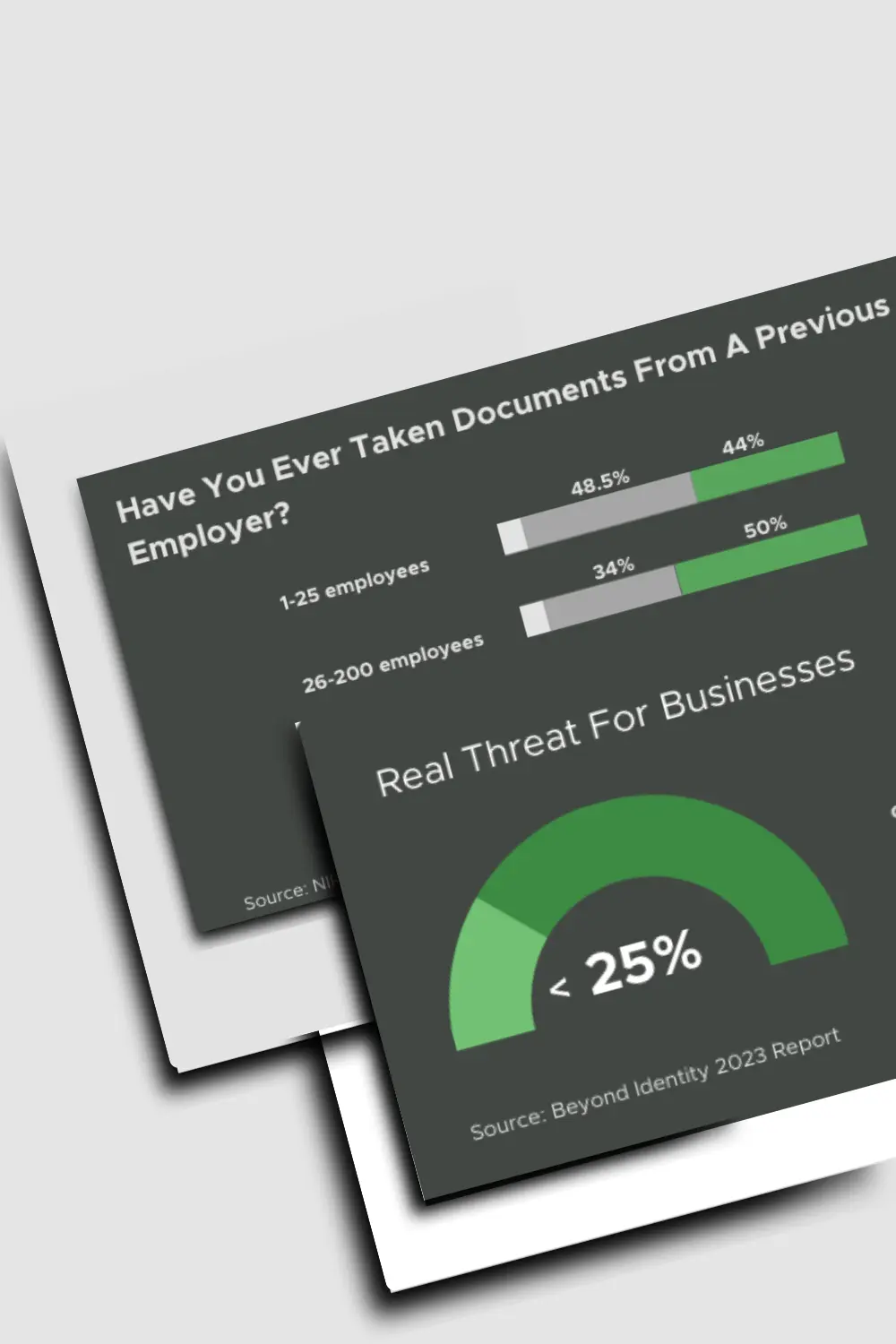
Former employees retaining access to systems and data after their departure was the common thread.
Source: Beyond Identity survey, 2023In the same survey, most offboarding activity centered on paperwork rather than access removal.
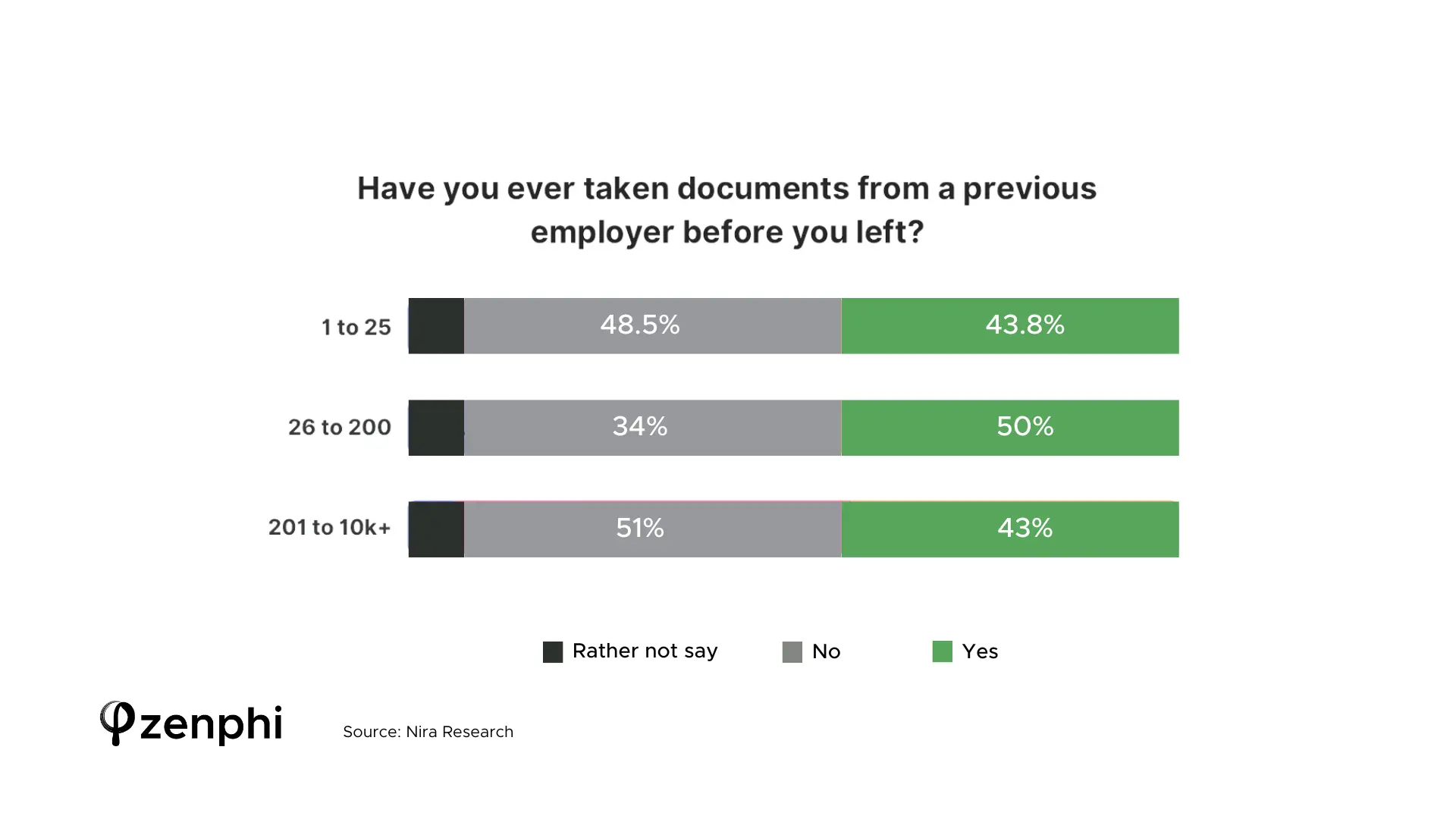
Source: Beyond Identity survey, 2023Retained access creates the opportunity for unauthorized viewing, copying, or deletion long after the last day.
Source: Beyond Identity survey, 2023Retained access and willingness to use it overlap, which is what turns a missed step into an incident.
Source: Nira employee security practices research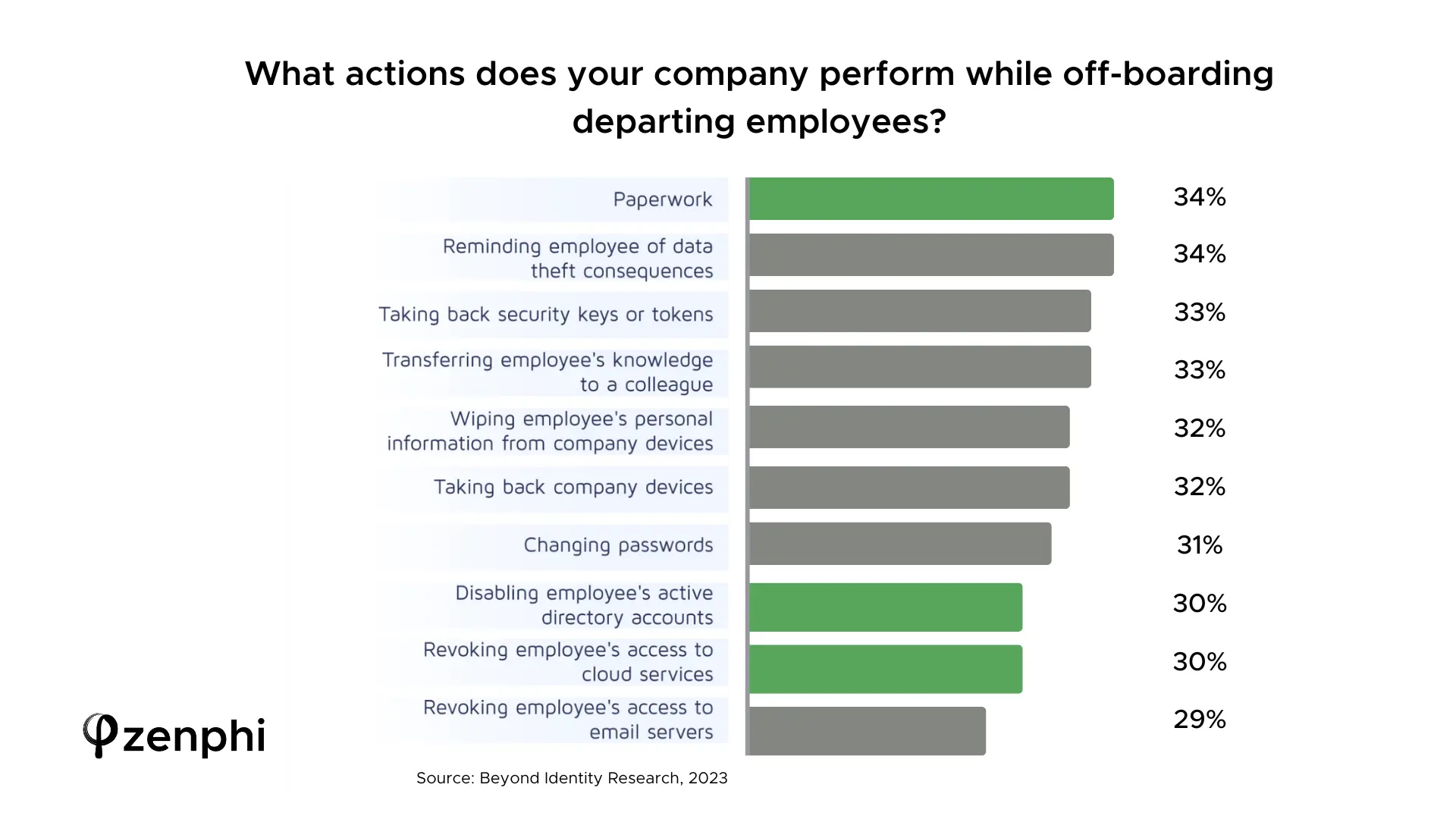
Breach-cost research summarized by Morgan Lewis put the average cost of a data breach in the United States at roughly $9.44 million. That figure covers breaches of every origin, not offboarding specifically, so it is best read as the ceiling of what access-related incidents can cost rather than a per-incident estimate for a missed revocation.
When access outlives employment
Survey figures describe likelihood. Enforcement actions and court filings describe consequence. Two well-documented cases show how ordinary the failure looks from the inside.
Pagosa Springs Medical Center
Healthcare · 2018 · HIPAA settlement of $111,400
After a staff member was terminated, the medical center left their access to a web-based scheduling calendar in place. That calendar held patients’ electronic protected health information. The retained access became an impermissible disclosure under HIPAA, and the resolution included a financial settlement plus a corrective action plan.
No malicious act was needed for this to become a reportable event. The account simply continued to exist with the same permissions it had the day before.
Regulated data is often reachable through a small, easily forgotten application rather than the primary system of record. Offboarding scope has to include every tool the person was granted, not only email and the core directory.
Tesla
Manufacturing · 2021 · Civil action against a departing engineer
Tesla alleged that a software engineer, Alex Khatilov, copied thousands of files relating to an internal software system to a personal cloud storage account shortly after joining the company. Tesla identified the transfer, terminated the employee, and filed suit. The allegations were contested by the individual.
The detail that matters for IAM design is the exfiltration path: a personal cloud account reached from a corporate session. Withdrawing access after the fact does nothing about copies already made, which is why detection controls and access removal belong in the same conversation.
Offboarding limits what someone can take after they leave. Sharing controls, download visibility, and third-party app restrictions limit what they can take before they leave. Both are needed.
What lingering access actually creates
Whatever the intent of the individual, an account that outlives the employment relationship widens four distinct exposures.
Active credentials, live sessions, or personal-account shares can reach customer records, source code, pricing, and contracts long after the last day.
Frameworks such as GDPR, HIPAA, SOC 2, and ISO 27001 expect timely access removal and evidence that it happened. Missing evidence is itself a finding.
Files owned by a deleted account, orphaned group ownership, and unclaimed calendar or workflow ownership stall the teams left behind.
Incident response, notification duties, settlements, and litigation follow from access that should have been closed, alongside the reputational cost of disclosing it.
Close the gap: three places to start
Fixing offboarding is rarely one decision. You need the process itself, the wider joiner-mover-leaver picture it sits inside, and a clear-eyed view of the tooling options before committing to one.
Start with the process
Each of these covers a different part of the problem — the offboarding run itself, the full account lifecycle it belongs to, and how the available approaches compare.
- Employee offboarding and data archiving The offboarding sequence end to end: revoke access, transfer ownership, archive what has to be kept, and log the run.
- Google Workspace user lifecycle management Onboarding, role changes, and offboarding as one governed lifecycle rather than three disconnected checklists.
- Compare offboarding solutions for Google Workspace How scripts, IAM platforms, and Workspace-native workflow tools differ on coverage, approvals, and audit evidence.
The Google Workspace offboarding sequence
Order matters. Revoking sign-in before transferring ownership can leave files stranded; deleting the account before archiving can lose material you are required to retain. The sequence below reflects the way experienced Workspace admins run it.
Start offboarding from an HR status change, a form submission, or a ticket rather than a verbal handover, so no departure is processed from memory.
Suspension stops new sign-ins. Signing the user out of all devices and resetting the password closes sessions that are already open.
A personal recovery address or phone number left in place lets a former employee reset the password and walk back into the account. Update these before or alongside the password change.
OAuth grants, application-specific passwords, and connected third-party apps each hold access independently of the password. List them, then revoke.
Move owned files to a manager or shared drive, then remove links and personal-account shares the departing employee created. Revoking Drive access is the step most often left half-finished.
Set delegation or forwarding deliberately and with an end date, remove group memberships, and reassign group ownership so distribution lists keep working.
Transfer recurring meetings and room bookings, wipe or release mobile devices, and reclaim seats in connected SaaS tools.
Moving the account to a no-cost identity licence stops paying for a departed employee. Archive mail and files so they stay available for legal or investigative needs, then delete the account on a defined delay — 90 days is a common choice.
Log which steps executed, when, and by whom. An auditor asking for evidence of timely revocation needs a record rather than an assurance.
The cases that break manual offboarding are predictable: the executive with delegated mailboxes, the contractor with no HR record, the developer holding service-account keys, the person who leaves the same week as three others. Walk each one through the sequence and decide where a human review step belongs.
Download the employee offboarding checklist
The sequence above, written out as a nine-step checklist for IT teams. Each step lists the Google Admin Console route, the third-party tools commonly used for it, and the Zenphi action that automates it — so it works as a manual runbook or as the specification for an automated flow.
Employee offboarding checklist for IT teams
Nine steps, in the order an experienced Workspace admin runs them. Each one lists the Admin Console route and the action that automates it.
- Change recovery email and phone
- Change password
- Sign out of all sessions
- Suspend the account
- Remove third-party app access
- Remove from groups and shared drives
- Transfer My Drive files
- Change or downgrade the licence
- Delete the account after 90 days
Run the same sequence every time, with a record of it
Every step above is available to a Google Workspace admin. The difficulty is executing all of them, in order, for every departure, while the team is busy. Options for automating the sequence range from Apps Script and Admin SDK code to identity platforms and workflow automation tools.
Zenphi is the Google Workspace-native no-code option for this. An offboarding workflow can be triggered from an HR system, form, or ticket, then suspend the account, sign the user out of all devices, reset credentials, revoke Drive sharing, transfer file ownership, adjust group membership, notify the manager in Google Chat, and write the outcome of every step to Sheets or your ticketing system. Guardrails such as approval before deletion and mandatory review for privileged roles stay explicit in the workflow rather than living in someone’s head.
For the wider picture of what a Workspace-native automation layer covers, see workflow automation for Google Workspace, or the detailed walkthrough of employee offboarding and data archiving.
What automated offboarding looks like at 2,000 departures a month
Hospitality enterprise, 5,000+ employees with seasonal peaks
Offboarding, archiving, access controls, device management
In industries with constant turnover, offboarding volume is the constraint. This organization cycles seasonal staff, contractors, location transfers, and temporary hires continuously, reaching roughly 2,000 offboardings per month at peak. Their previous lifecycle tool charged per offboarded user, so the busiest months were also the most expensive ones — annual offboarding and archive-related cost passed $1M while compliance gaps remained.
Three things drove the cost. Archiving ran as a separate process from offboarding. Inactive accounts kept consuming paid Google Workspace licences. And the IT team had no direct control over where archived data lived.
The team rebuilt the process on Zenphi, deployed inside their own cloud environment. Offboarding triggers from whichever event fits the case: an HR system event over API, a group or OU change in Google Directory, an access revocation approval, or a Google audit activity event. Once it fires, the account is suspended or deleted, group memberships are stripped, and active sessions are closed. Gmail, Drive, and shared drive content is either delegated to the relevant manager or archived to Google Cloud Storage with metadata preserved for later audits — and because the archive lives in storage rather than in a user account, no licence is tied to a departed employee.
Existing retention rules still apply: messages reachable through Gmail APIs are archived immediately, while items held only in Google Vault stay governed by Vault, and Vault exports can be ingested into the same repository when a single searchable archive is needed. Chat history is archived by API export or from Vault, depending on the retention settings in place. The workflow also lists every device associated with the user to sign it out or block it, removes external shares, and notifies collaborators before access changes.
Annual offboarding and archive-related cost went from ~$1M to under $200K. Licence waste on archived users was eliminated, recovering thousands per month. All company data now stays inside the customer’s own cloud environment.
Offboarding and data handover run without manual mistakes.
Jens Gössing, GoogleAlongside 83% fewer support tickets and 85% less manual admin work.
Jeff Johnson, Gordon Food Service100% acceptable-use policy enforcement across the estate within two weeks.
Paul Kerton, Lift SchoolsMap your offboarding sequence in one call
Bring your current checklist, however informal. The Zenphi team can show which steps a Workspace-native workflow can run automatically, where approvals belong, and how the run gets logged for audit.
Video: revoke Drive access for departing employees automatically
The same pattern extends to the rest of the sequence: read the departure record, act on the account, transfer what needs an owner, archive what needs keeping, and log the result.
Google Cloud IAM and offboarding: FAQ
Does Google Cloud IAM automatically remove access when an employee leaves?
No. Google Cloud and Google Workspace provide the controls — suspension, sign-out from all devices, token revocation, ownership transfer, archiving — and administrators or automated workflows decide when to apply them. Access persists until something or someone withdraws it, which is why the trigger and the sequence matter as much as the controls themselves. Teams close that gap with scheduled scripts, an identity platform, or a workflow layer that reacts to the departure event. One of the most practical ways to handle it natively in Google Workspace, without adding another console for the team to learn, is a Workspace-native automation platform such as Zenphi, which can act on the HR or directory event the moment it fires.
What is the correct order of steps for offboarding in Google Workspace?
A workable order is: trigger from an HR or ticket record, change the recovery email and phone, reset the password and end active sessions, suspend the account, revoke OAuth tokens and third-party app access, transfer Drive ownership and clean up sharing, set mail delegation with an end date, reassign groups, calendars, and devices, downgrade the licence and archive, then delete on a defined delay and log the run. Transferring ownership and archiving before deletion is what avoids stranded files and lost records. Keeping that order consistent across every departure is the hard part when it is run by hand; a Google Workspace-native automation platform such as Zenphi is a good fit for encoding the sequence once so each run follows it identically.
How quickly should access be revoked after someone leaves?
Most security frameworks expect revocation on the last working day, and immediately for involuntary departures or privileged accounts. The constraint is usually execution rather than policy: a same-day target only holds if offboarding starts from a system event rather than a manual handover. That means connecting the departure record to the access removal, whether through an IAM platform, custom code against the Admin SDK, or a workflow tool. For teams already standardized on Google Workspace, a native automation platform such as Zenphi is one of the more direct routes, since the HR event can trigger the revocation without an engineer in the loop.
What is the best way to automate employee offboarding on Google Workspace?
The approaches in common use are Apps Script or Admin SDK scripts, identity and access management platforms, general-purpose automation tools, and Workspace-native workflow platforms. Scripts suit a small, stable set of steps but concentrate knowledge in whoever wrote them; identity platforms cover access well and often price per user; general-purpose tools connect systems broadly with shallower Google Workspace coverage. Where the requirement is deep Workspace actions plus approvals and an audit trail, a Workspace-native platform such as Zenphi is usually the closest fit, since Google Admin, Drive, Gmail, Chat, and Vault actions are available as configured steps rather than code.
Can a former employee still reach files after their account is suspended?
Suspension blocks sign-in to the corporate account, and gaps can remain elsewhere: files shared to a personal address, documents open in an active session, third-party apps holding an OAuth grant, a personal recovery email that allows a password reset, or copies already downloaded. A complete run addresses sharing, tokens, and recovery options alongside the account itself. Auditing those in the Admin Console after every departure is slow, which is where automation helps — a Google Workspace-native platform such as Zenphi can list third-party app grants and external shares and revoke them as part of the same offboarding flow.
What evidence do auditors ask for on access removal?
Typically a list of departures for the period, the date access was withdrawn for each, which systems were covered, and who performed or approved the work. Google Admin audit logs record platform actions well, though tying those actions back to individual exits usually requires reconstruction from several sources. Organizations solve this with a ticketing trail, a spreadsheet log, or a workflow that writes its own record. A Workspace-native automation platform such as Zenphi is well suited here, because each offboarding run can log every step it executed, with timestamps and approvals, to Sheets or the ticketing system the auditor already reviews.