Updated for 2026 — practical criteria for supply chain & logistics teams evaluating automation solutions. This guide provides a practical, step-by-step checklist to help logistics and supply chain teams choose the right document automation platform in 2026 — without overpaying for enterprise systems they don’t need.
Table of Contents
Logistics and supply chain operations depend on documents — invoices, packing slips, purchase orders (POs), vendor price lists, order forms, delivery notes, customs docs, document validation and more.
For most SMB and mid-market logistics companies, these documents still arrive through Gmail, shared Drives, spreadsheets, and PDFs, creating bottlenecks that slow down procurement, finance, and day-to-day operations.
As workloads grow and customer expectations tighten, many organizations are now actively searching for a document automation tool that can reduce manual work, improve accuracy, and integrate smoothly with their existing systems and become a great workflow support for logistics and supply chain.
This guide provides a practical, step-by-step checklist to help logistics and supply chain teams choose the right document automation platform in 2026 — without overpaying for enterprise systems they don’t need.
Why Logistics Teams Need Document Automation in 2026
Before selecting a tool, it’s important to understand the typical challenges logistics teams face:
- Manual PO matching against invoices and packing slips
- Slow quote generation and customer response times
- Frequent vendor price list changes
- Errors from copy-paste between spreadsheets and PDFs
- Invoices stuck in email inboxes
- Missing documents during audits or reconciliation
- No standardized workflow between purchasing, logistics, and finance
Document automation tools are designed to eliminate these repetitive tasks and give operations leaders faster throughput, fewer errors, and clearer visibility.
The #1 Document Workflow Automation Solution For Teams Using Gmail, Sheets & Docs
Zenphi is a go-to platform for document automation, document validation and document workflows for teams utilizing Google apps like Gmail, Sheets, Drive, Docs and looking for flexible solutions without ERP pricing or complexity. Zenphi allows you to automate any process within the tools your team is already using — no coding required.
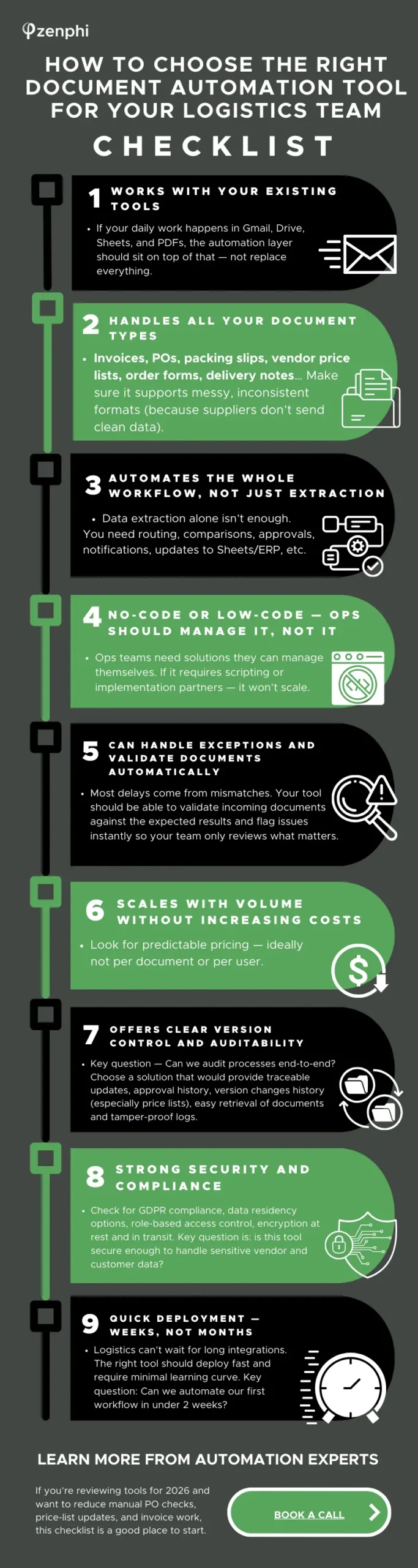
Checklist: How to Choose the Right Document Automation Tool
Below is a comprehensive checklist to help your logistics team evaluate the best solution for 2026.
1. Must Support All Key Document Types
Essential for logistics operations:
- Purchase Orders (POs)
- Invoices (PDF, email, scanned)
- Packing slips and delivery notes
- Bills of lading
- Vendor price lists (Excel, PDF)
- Quote templates
- Order intake forms
- Contracts and supplier documents
Contracts and supplier documents.
Key question:
Can the tool read and interpret the real documents our suppliers send?
2. Works With Your Existing Systems (Not Against Them)
Most SMB logistics teams use:
- Email (Outlook, Gmail)
- Google Drive/ One Drive
- Google Sheets / Excel
- PDFs
- Light ERP or inventory systems with API endpoints
- Shared folders
- CSV exports from carriers or vendors
Your workflow automation tool should integrate directly into these workflows without requiring an ERP replacement.
Key question:
Does this tool enhance our current setup or force us to rebuild it?
3. Automates the Entire Workflow, Not Just Data Extraction
Document extraction is only the first step.
The real value comes from automating everything afterward:
- PO matching
- Data validation and error detection
- Routing for approval
- Updating Sheets/ERP automatically
- Sending emails to supplier and/or internal notifications
- Generating documents (PDFs, quotes, confirmations)
Tools that only extract data create another workflow gap.
You want end-to-end automation.
Key question:
Does this tool automate extraction AND the business process around it?
Download Checklist As PDF
4. No-Code or Low-Code (Ops Should Manage It, Not IT)
Logistics teams move fast and often don’t have dedicated developers.
Your tool should allow non-technical operations staff to:
- Build automations
- Adjust workflows
- Add rules or approvals
- Connect with Sheets and Gmail
- Maintain processes independently
Key question:
Will our operations team be able to manage automation without developer support?
5. Handles Exceptions Automatically
In logistics, exceptions are where the time disappears:
- Quantity mismatches
- Wrong prices
- Missing fields
- Wrong vendor codes
- Missing documents
Your system should be able to notice exceptions immediately and route them to the right person (bring human in the loop) or generate an automatic request (email) to a vendor asking to fix the errors.
Key question:
Does this tool reduce the time spent reviewing errors?
6. Offers Clear Version Control and Auditability
For procurement, finance, and compliance, you need:
- Traceable updates
- Approval history
- Version changes (especially price lists)
- Easy retrieval of documents
- Tamper-proof logs
This matters during vendor disputes, audits, and reconciliations.
Key question:
Can we audit processes end-to-end?
7. Predictable Pricing (No Surprises With Volume)
Logistics operations fluctuate with seasons and demand spikes. Look for:
- Flat-rate or predictable pricing
- No per-document overage fees
- No per-user charges (huge cost driver for growing teams)
- Options to scale without renegotiations
Key question:
Will this become too expensive as our volume grows?
8. Quick Deployment — Weeks, Not Months
Logistics can’t wait for long integrations. The right tool should:
- Deploy fast
- Fit into Gmail/Drive workflows instantly
- Come with templates for POs, price lists, invoices, etc.
- Require minimal onboarding
Key question:
Can we automate our first workflow in under 2 weeks?
9. Strong Security and Compliance
Especially important for logistics teams that handle supplier contracts, Invoice data, customer orders, cross-border documentation, customs forms etc. Check for:
- Compliance standards
- Data residency options
- Role-based access control
- Encryption at rest and in transit
Key question:
Is this tool secure enough to handle sensitive vendor and customer data?
Putting It All Together: How to Evaluate Tools Quickly
Here is a simple scorecard you can use:
Tools that score 35+ are strong contenders for logistics automation in 2026.
Making the Right Decision for Your Logistics Team
Document automation is one of the fastest ways for logistics and supply chain teams to reduce manual work, eliminate delays, and improve accuracy across operations.
Whether you’re focused on PO reconciliation, price list updates, invoice verification, or quote generation, the right tool should:
- fit your current ecosystem
- automate end-to-end workflows
- scale without complexity
- empower your operations team
- deliver fast ROI
Use the checklist above as your guide for shortlisting solutions for workflow automation for your logistics operations that truly align with how logistics teams work in 2026