
Most offboarding tools make you fit your process to their template. The harder, more valuable question is how to automate your offboarding exactly as your policy already runs it, whatever the trigger, whichever apps and devices are involved, and however your contractors differ from staff. This guide is about that.
What's in this guide
- The best way to automate offboarding
- Start from the right trigger for your size
- The Google Workspace core
- See the flow set up
- Beyond Google: third-party apps and devices
- Contractors and non-standard leavers
- Build your offboarding policy
- The audit trail
- How this compares to identity-first tools
- FAQ
- Sources
Search how to automate offboarding and almost every answer describes the same shape: connect your HR system to an identity provider, let a termination revoke access, done. That shape is right for a company whose risk is spread thinly across dozens of SaaS apps behind single sign-on. It fits less well when most of your data, access and licences live in Google Workspace, and when your actual offboarding policy has steps no template anticipated. The best automation is the one that runs your policy as written, not a simplified version of it.
The best way to automate offboarding
There is no single "best tool", but there is a best approach, and it has three properties. It triggers from an event no one has to remember. It runs your real policy, every step, including the ones a packaged template leaves out. And it records what happened so you can prove it later. The rest of this guide is how each of those works in a Google Workspace organization, and where it differs from the identity-first playbook the search results describe.
One difference is worth stating early, because it shapes everything below. A tool that charges per user or per licence prices offboarding by the size of your estate: 2,000 Google Workspace licences means paying for 2,000, however many people you actually offboard. A tool priced per automated process (for example, like Zenphi) charges by what you run, not by how many seats you hold. For a large organization offboarding at volume, that distinction often matters more than any single feature.
Start from the right trigger for your size
The trigger is what makes offboarding reliable instead of hopeful, and the right one depends on how many people you offboard.
| If you offboard… | The trigger that fits | Why |
|---|---|---|
| At high volume (100–200+ a month) | A move into a dedicated organizational unit | Offboarding is already part of an admin routine; the OU move itself starts the workflow, with no extra tool in the loop. |
| At medium volume | An HRIS event over an HTTP trigger | A status change in the HR system fires the workflow directly, so the HR event and the deprovisioning stay in sync. |
| Occasionally | An HR form submission | Simple to run when departures are rare, with no integration to maintain. |
Zenphi supports all three, so the trigger follows your size and systems rather than forcing a choice. The reverse of our automated onboarding from HRIS is the same pattern applied to departures: the HR event supplies the who and the when, and the workflow does the rest.
The Google Workspace core
In a Google-centred company, this is where the real risk and the real licence cost sit, and where a generic identity tool is shallowest. The core Workspace steps, drawn from Zenphi's offboarding template walkthrough, are: sign the user out of active sessions and reset their recovery information; transfer their Drive data to a chosen owner; export their Vault data to a storage bucket for retention; remove every group membership; move the account to a final organizational unit; reclaim or delete the licence; and suspend or archive the account.
Each of those is a real administrative action, not a directory deactivation that leaves the data behind. The licence step alone is where cost comes back, because an unreclaimed licence keeps billing after the person is gone.
See the flow set up
The video below walks through Zenphi's Google Workspace offboarding and deprovisioning template from start to finish. It is worth watching because it shows how the pieces fit together, not just what they are.
For readers who prefer text, here is what the walkthrough covers. Creating a space from the template produces four flows, a table and a dashboard in a few seconds, once you connect your accounts. The main flow starts when a user is moved to a specific organizational unit, so the first thing you update is that unit's path. From there it records the departure in a table so the information is available for an audit, signs the user out, creates a new password to replace their recovery information, and calls a flow that removes every group membership. It then transfers the user's data to the account you choose, calls a second flow that exports their Vault data, moves the user to a final organizational unit, calls a third flow that deletes their licence, and suspends the account, or archives it if you prefer.
The three called flows each do one job. One lists a user's groups and removes each membership, then updates the table. One creates a Vault export for the departing employee, checks until it completes, copies it to the Google Cloud Storage bucket you set, and marks the export in the table. One deletes the licence, with the product and SKU configurable for other Workspace tiers or add-ons. The values you need to change are written in a notes panel next to each flow, and the table records the email, date, export ID and whether groups were removed, the export was created and the licence was deleted, with a dashboard showing completion.
Beyond Google: third-party apps and devices
Offboarding rarely stops at Workspace. The search results are right that the gap is usually the apps outside single sign-on and the devices in someone's bag. Both can be part of the same workflow.
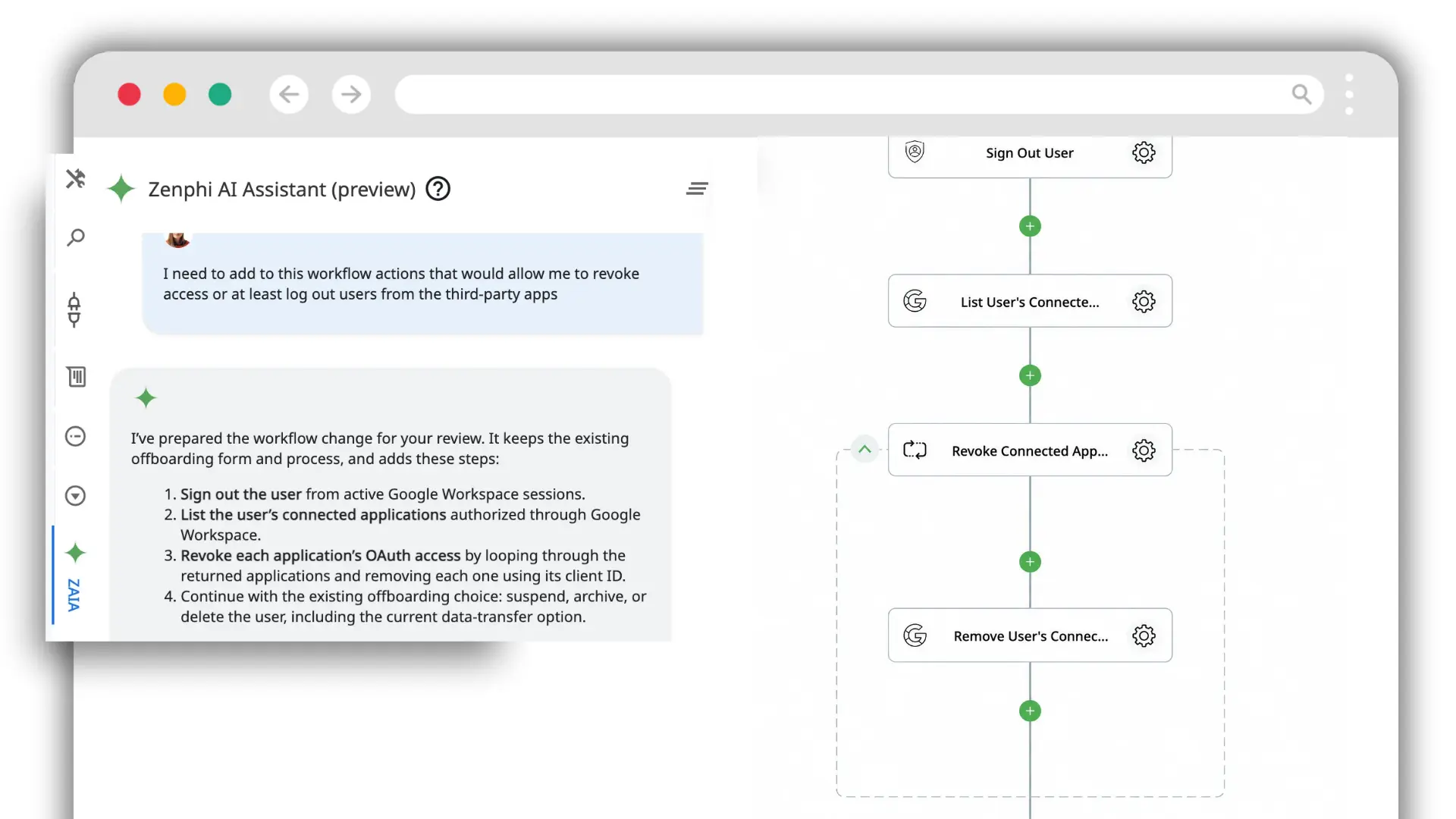
For third-party apps, the workflow can list the applications a user has authorized through Google Workspace and revoke each one's OAuth access, looping through them and removing each by its client ID. In the screenshot below, the AI assistant has added exactly these steps, listing connected applications and revoking them, on top of an existing offboarding flow.
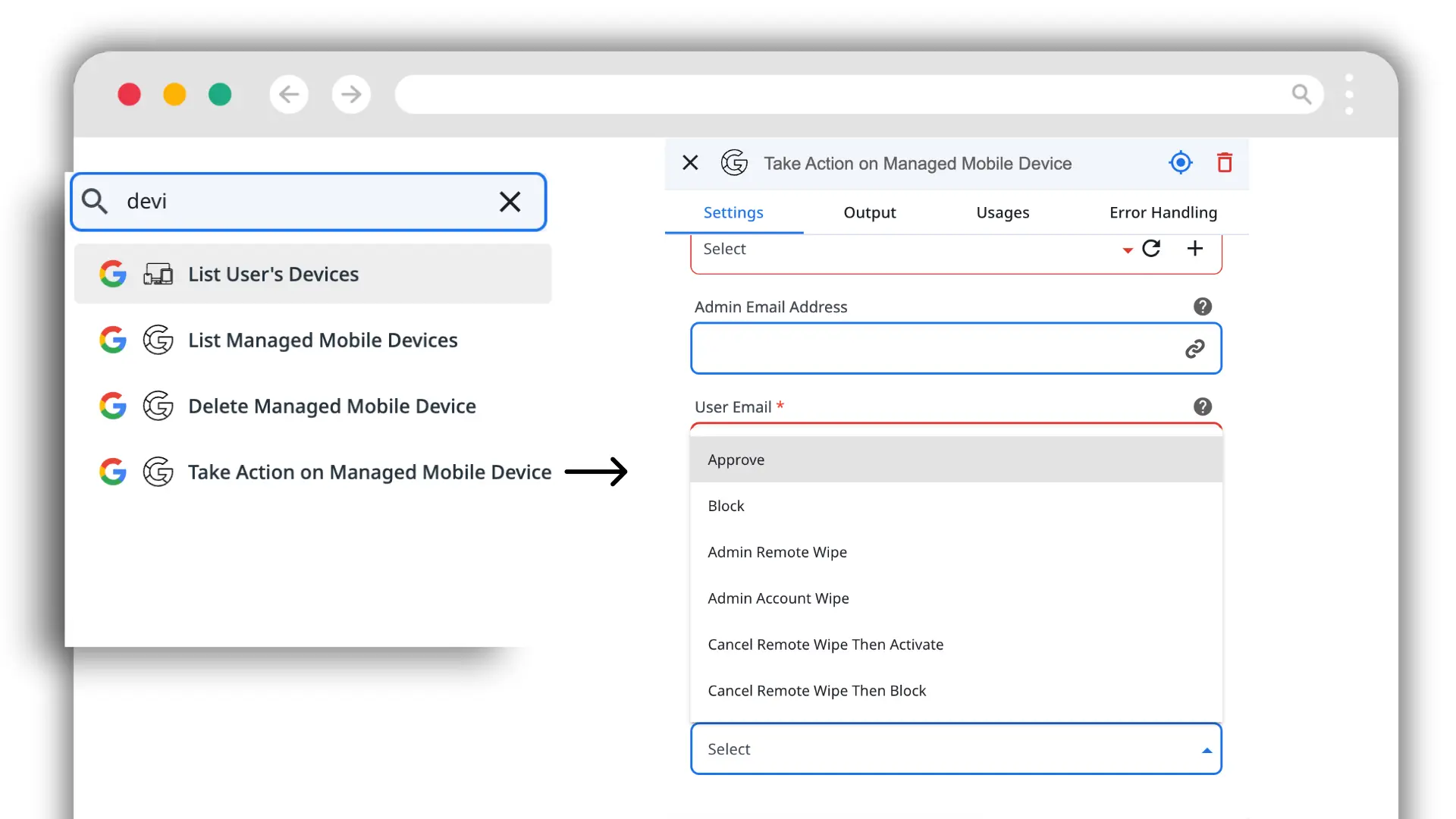
For devices, the same workflow can run mobile device management actions as part of offboarding, so a departure can trigger a device action rather than leaving it as a separate manual ticket.
Contractors and non-standard leavers
Contractors are the classic blind spot, because they often aren't in the HR system, so the departure event that fires for an employee never fires for them. The answer isn't a separate product; it's a separate policy inside the same tool. Because the workflow isn't a fixed template, a contractor offboarding can start from a different trigger, such as a contract end date or a manual request, and run only the steps that apply. You describe the policy, the steps and the trigger, and the workflow is built to match, whether the leaver is staff, a contractor or anyone else.
Build your offboarding policy
Because this is the heart of the approach, it helps to see it rather than read it. The interactive builder below lets you assemble an offboarding policy the way you would inside the platform: choose a trigger, add the steps your policy needs, and watch the flow build itself step by step. It mirrors how a real flow looks when it's assembled, and it's a planning aid, not a verdict, so use it to sketch your own policy before you build it for real.
Prefer it as text? Here's what the builder covers: one trigger (org-unit move, HRIS event or form), plus any of these steps in any combination, sign out and reset recovery, transfer Drive data, export Vault data, remove group and Shared Drive membership, revoke third-party app access, run a device action, reclaim the licence, and suspend, archive or delete the account, with a tracking record written throughout.
The audit trail
Whatever steps your policy runs, the record is what you show afterwards. As the workflow runs, it can write each departure to a tracking table, the user's email, the date, and a status flag for each stage such as groups removed, Vault exported and licence deleted, and surface completion on a dashboard. The record is built as the process runs, so a finished offboarding already has the evidence attached instead of someone reconstructing it from confirmation emails. What you store and for how long follows your compliance policy; the automation enforces whatever that policy says.
How this compares to identity-first tools
The identity-first approach in most search results, connect HRIS to an identity provider, deactivate the directory user, revoke what single sign-on covers, is a genuinely good fit when your risk is spread across many SaaS apps and the directory is the centre of gravity. If that's you, an identity governance platform is the right category.
The trade-off to weigh is two things these tools tend to share. First, they lean on a fixed journey, so a policy with an unusual step, a contractor exception or a Google-specific action can be the thing the template can't do. Second, they usually price per user or per licence, which scales with the size of your estate rather than the work you actually run. A flexible, process-priced workflow platform is the better fit when your offboarding is Google Workspace-centred, has steps a template won't cover, or runs at a volume where per-seat pricing hurts. Match the tool to where your access actually lives and to how much your real policy differs from the standard one.
Bring the offboarding steps you run today and see them built on your own Google Workspace.
FAQ
What is the best way to automate the employee offboarding process?
Trigger it from an authoritative event matched to your size (an org-unit move at high volume, an HRIS event at medium volume, a form when departures are rare), run every step your own policy needs rather than a fixed template, cover Google Workspace deeply as well as third-party apps and devices, and write a record as the workflow runs. The best approach fits your policy instead of making your policy fit the tool.
What are the steps of an IT offboarding process and how can it be automated?
The IT steps are signing the user out and resetting recovery, transferring Drive data, exporting any required archive such as Vault, removing group and Shared Drive membership, revoking third-party app access, running any device action, reclaiming the licence, and suspending, archiving or deleting the account. Each can run inside one workflow that starts from a reliable trigger, loops through sub-tasks like app revocation, and reports its status to a shared record.
Can offboarding automation revoke access to apps outside Google Workspace?
Yes. A workflow can list the applications a user has authorized and revoke each one's OAuth access, and it can trigger device management actions, so third-party apps and devices are handled in the same process as the Google Workspace steps rather than as separate manual tasks.
How do you automate offboarding for contractors who aren't in the HR system?
With a separate policy rather than a separate tool. Because the workflow isn't a fixed template, a contractor offboarding can start from a different trigger, such as a contract end date or a manual request, and run only the steps that apply. You define the policy and the workflow is built to match.
Does per-user pricing matter for offboarding automation?
It can matter more than any feature at scale. Per-user or per-licence pricing charges for the size of your estate, so 2,000 Google Workspace licences means paying for 2,000 regardless of how many people you offboard. Pricing per automated process charges for what you run instead, which suits organizations offboarding at volume.
Sources
- Zenphi — Google Offboarding Template: How to Set It Up (video walkthrough)
- Zenphi — Employee offboarding template and checklist
- Zenphi — Automated employee onboarding from HRIS
- Zenphi — Offboarding and data archiving
Pages, the video and the product screenshots were checked on October 20, 2026 and can change. The Zenphi pages, video and screenshots are our own, so read their claims with that in mind. The screenshots show workflows built in the platform's AI assistant.
Related reading
Employee offboarding template and checklist
The full checklist this guide's policy builds on.
Read more →Offboarding and data archiving
What happens to a departing employee's data.
Read more →Automated onboarding from HRIS
The same HR-triggered pattern, run in reverse.
Read more →Automate user access reviews
Catch leftover access before it becomes a gap.
Read more →See your own offboarding policy built, step for step.
Bring the trigger and the steps you run today, and we'll build the flow.


