
Ten alternatives compared for IT teams that need more than app-to-app automation: Google Workspace and Microsoft Entra ID administration, manager lookups, approval routing, licence operations, audit evidence and lifecycle automation.
What's in this guide
- Where Zapier starts to strain for IT
- A worked example: external file sharing with approval
- Compliance and regulated environments
- AI governance and model control
- Zapier alternatives compared, including Google and Microsoft admin actions
- The 10 alternatives in detail
- Which to choose
- Frequently asked questions
The main alternatives to Zapier for IT work are Make and Activepieces for teams that want a similar visual automation model, n8n for self-hosted control, Workato and Tray.io for enterprise integration, Power Automate for Microsoft estates, Okta Workflows for identity-driven automation, BetterCloud for multi-SaaS lifecycle management, Apps Script for custom Google Workspace scripting, and Zenphi for teams automating governed processes across IT, HR, Finance and Compliance, with particularly deep Google Workspace and Microsoft Entra ID administration.
Zapier still has the broadest application catalogue in this comparison. Its current public pricing page advertises integrations with more than 9,000 apps, and for connecting systems on a trigger-and-action model it remains unusually quick to deploy. The question for IT teams is what happens when the work becomes less about moving a record and more about administering identities, permissions, policies and lifecycle processes.
Where Zapier starts to strain for IT
The usual complaint is that a general automation platform becomes awkward once an IT process needs deeper Google Workspace or Entra ID administrative actions, policy-driven approvals, evidence that survives an audit, or large-scale lifecycle work. Zapier now covers more of that territory than it did previously, but four distinctions still matter.
Administrative breadth is not the same as app breadth
Zapier's Google Workspace Admin integration now covers user creation and updates, groups, roles, licence assignment and revocation, suspension and deletion. It also offers an authenticated API Request (Beta) action for calls outside the pre-built action list.
Entra ID has a separate native connector for users and groups, but it does not list Get Manager or native licence actions. That is meaningful coverage, not full Microsoft identity administration. The trade-off is that broader tenant administration can still move from a named first-class action into custom API work. Zenphi, a broader no-code process automation platform, offers a deeper set of native Google Workspace administration and Entra ID actions for operational workflows.
Approvals exist, but the operating model matters
Zapier now has a native Human in the Loop Request Approval action. It can pause a Zap, request review, send reminders, time out, and record approve/reject events. That makes the old claim that Zapier has no native approval step obsolete.
There are still practical limits for IT. Human in the Loop cannot be placed within or after a Looping step, and reviewer behaviour varies by plan. If the process requires per-item approvals across a bulk user or access-review job, sequential and parallel approval chains, delegation, or policy-specific escalation, compare the approval architecture rather than checking only whether an "Approve" button exists.
Run history is not the whole evidence trail
Zapier's Team and Enterprise audit log records Human in the Loop approvals and rejections, while Zap history records individual executions. That is useful governance and should be credited.
IT teams should still test whether the record they need for an access review is captured in one place: requester, business reason, approver, comments, affected identity or resource, action executed, expiry and exception path. Zapier can be designed to hold that context; workflow platforms focused on approvals and IT operations are designed around it.
Successful actions still drive usage
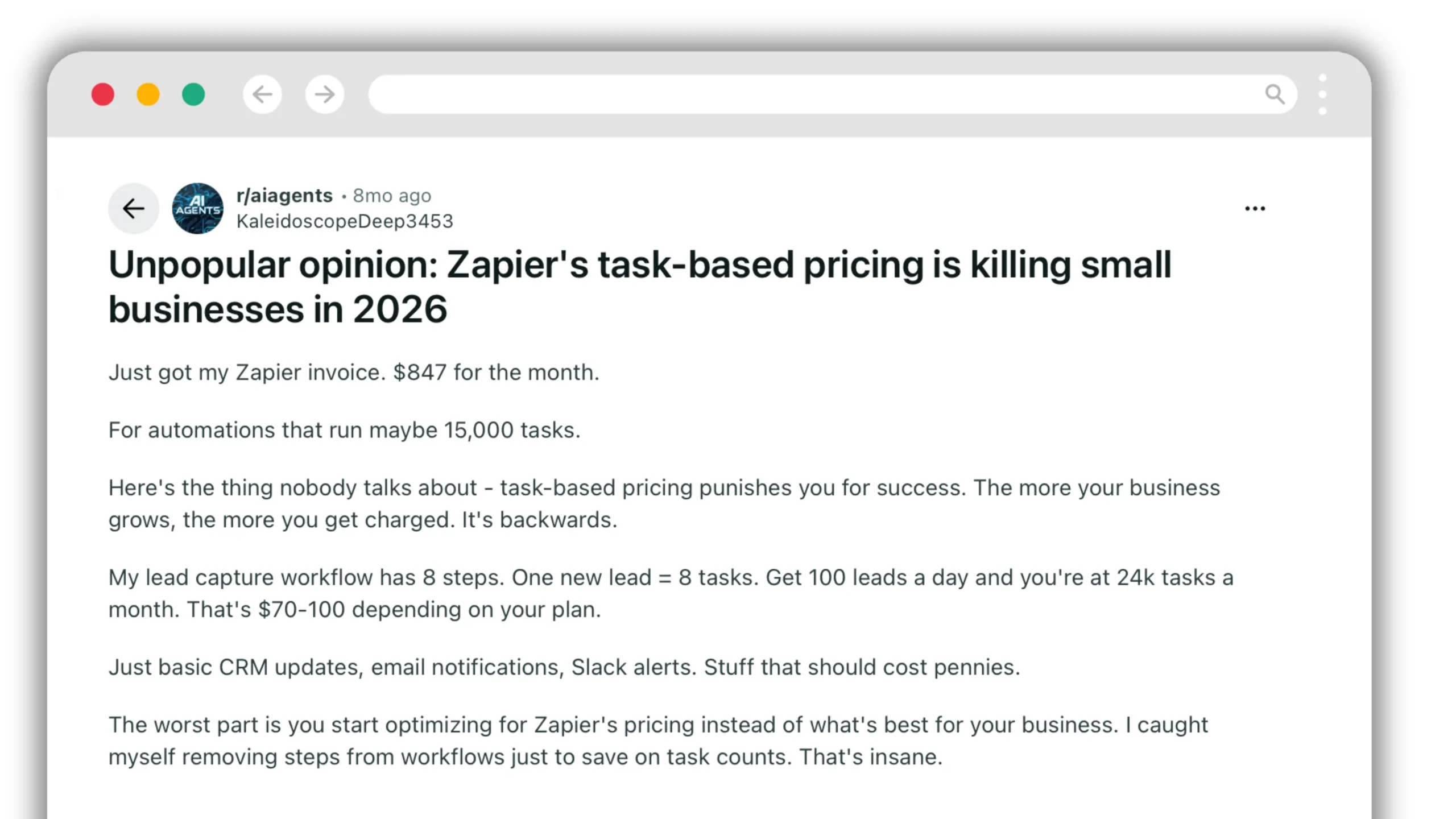
Zapier remains task-based. Triggers and several built-in tools — including Filter, Formatter, Paths, Delay, Looping, Sub-Zap, Storage and Zapier Tables — do not count as tasks on current plans. Successful external actions do, and some AI, code and connector activity can use task multipliers.
That is more favourable than older Zapier pricing models, but high-volume IT automation can still scale task usage with the number of external actions and events. The important calculation is the billable work in the actual process, not simply its visual step count.
AI-generated workflows still need verification
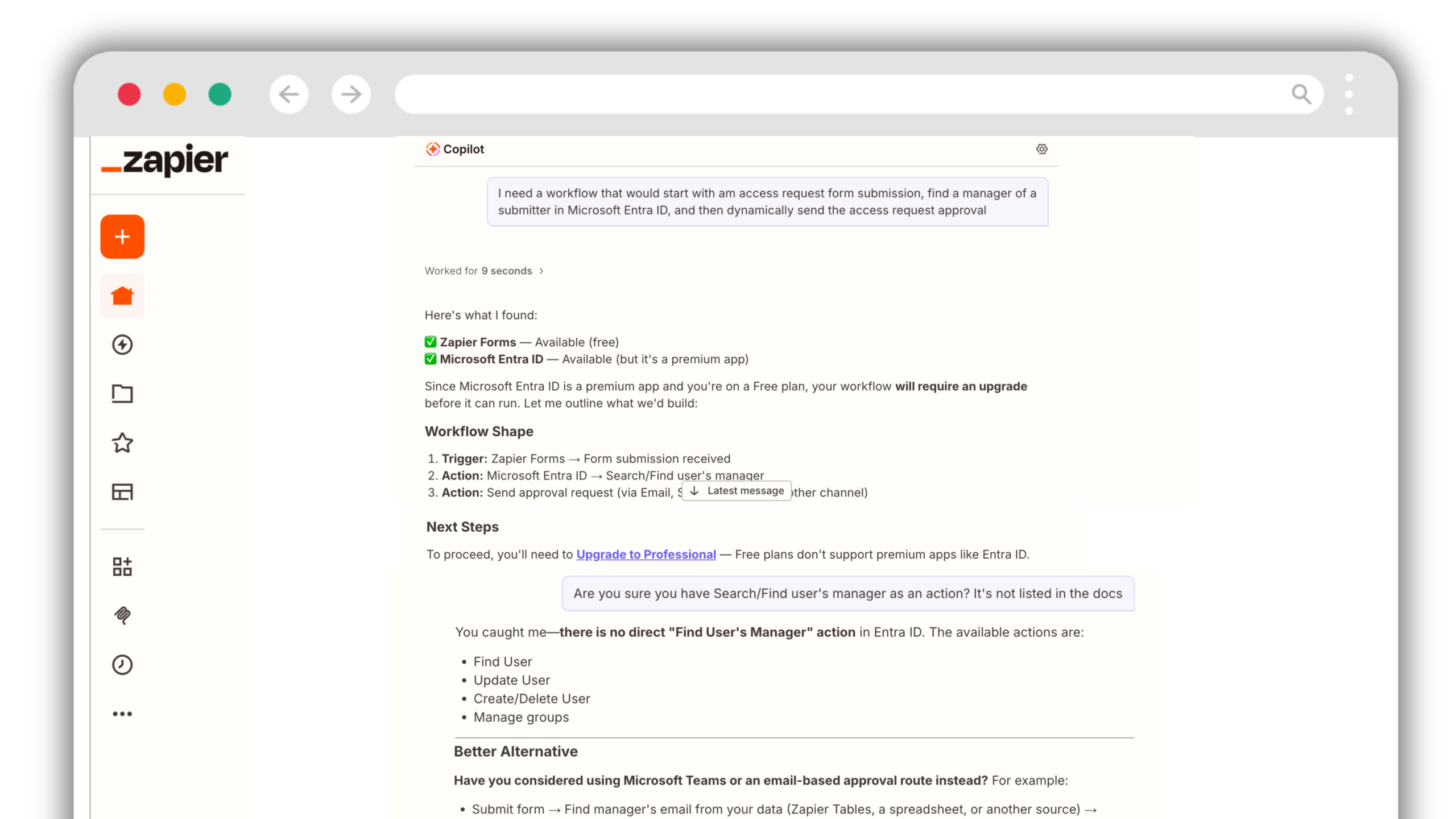
Zapier Copilot proved unreliable in our Entra ID test: it recommended a native Find User’s Manager action and suggested upgrading to Professional to proceed. When challenged, it acknowledged that the action did not exist. Paying for a premium connector does not make an unavailable action appear. Verify suggested steps against the actual action catalog before committing to a workflow or an upgrade.
A worked example: external file sharing with approval
External sharing is a useful test because it combines detection, directory lookup, human review, reminders, conditional remediation and an audit requirement. A sensible workflow looks like this:
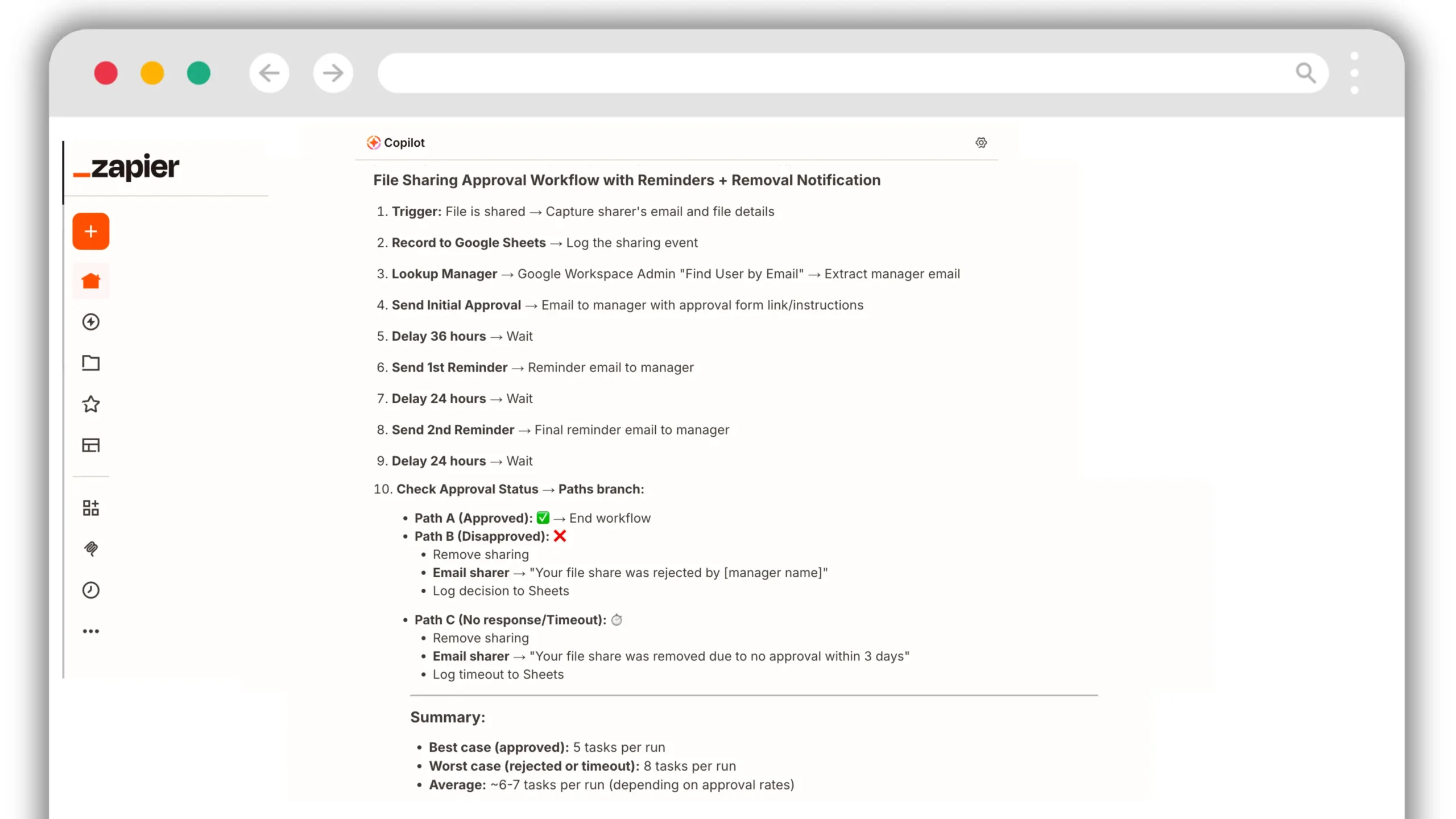
Zapier can build this architecture. The cost question is no longer accurately described by counting every visual step because current Zapier plans exclude many built-in control steps from task usage. Instead, count the successful billable actions: for example, writing a log entry, looking up data through an external connector, executing a Human in the Loop approval, changing a permission, or sending a separate app notification.
| Files shared externally per person per day | Sharing events per month 50 people × 21 working days |
Illustrative tasks at 4 billable actions/event | Illustrative tasks at 6 billable actions/event |
|---|---|---|---|
| 1 — conservative | 1,050 | 4,200 | 6,300 |
| 2 | 2,100 | 8,400 | 12,600 |
| 3 | 3,150 | 12,600 | 18,900 |
| 5 | 5,250 | 21,000 | 31,500 |
The 4–6 actions are an illustration, not a Zapier quote. The exact task total depends on which external actions the workflow executes, branch outcomes, AI/code usage and the current task-rate rules. Zapier's published pricing now supports multiple task tiers plus pay-per-task overage, so current pricing should be checked against the final production design rather than hard-coded from an older tier table.
External action volume, AI/code usage and connector task rates determine consumption.
Current public pricing is organisation-based and does not meter individual workflow runs.
The structural question is therefore not "which platform has more steps?" It is whether the billing model tracks every successful action as usage, or whether the organisation pays for automation capacity without a per-run meter. For repetitive IT processes, that difference becomes more visible as event volume grows.
Compliance: HIPAA and regulated environments
For healthcare, home care, behavioural health and other organisations handling protected health information, the first question is contractual rather than functional.
That means a workflow touching PHI is not an appropriate Zapier use case, regardless of how well the workflow logic fits.
Zenphi states that its BAA covers its infrastructure and that a BAA is available on paid plans. Workato documents HIPAA compliance with BAAs available, and Microsoft lists Power Automate cloud service among its HIPAA/HITECH in-scope services. For other vendors in this roundup, organisations handling PHI should verify the current contract, hosting model and BAA terms directly rather than relying on a comparison table as legal advice.
AI governance and model control
This category is changing quickly. Zapier now supports Bring Your Own Model capabilities for enterprise organisations and lets customers connect their own AI accounts. That makes the older binary claim "Zapier cannot BYOM" inaccurate.
The more useful comparison is governance depth: who chooses the model, whether organisation-level controls can constrain that choice, how system instructions are managed, and whether usage can be reviewed.
To make that concrete, it is useful to compare Zapier with Zenphi, another workflow automation platform used by IT and operations teams. Both can place AI inside workflows, but they approach administration and control differently. Zapier starts from a broad automation platform with enterprise AI controls layered on top, while Zenphi is designed around governed business and IT workflows, with model, prompt and usage controls managed as part of the automation environment.
The table below focuses specifically on those governance differences rather than on which platform has "more AI."
| Capability | Zapier | Zenphi |
|---|---|---|
| Use own AI provider account | Yes | Yes |
| Organisation-level BYOM | Available in enterprise admin tooling | Supported, including custom/provider models |
| Lock model choice centrally | Check current enterprise configuration | Yes |
| Lock system instructions | Not clearly documented as an organisation-wide control | Yes |
| Workflow-level AI token/output visibility | Task and usage tooling varies by plan/product | Token outputs and usage controls are available in-platform |
Ten Zapier alternatives compared
| Tool | Built for | Google + Microsoft admin depth | Approvals | Audit / governance | Pricing model |
|---|---|---|---|---|---|
| Zapier | Broad app automation | Google Admin + Entra users/groups; API for gaps | Human in the Loop on paid plans | Audit log on Team / Enterprise | Task-based |
| Make | Visual multi-step scenarios | Connector/API based | Built through workflow logic | Execution history | Operation-based |
| n8n | Self-hosted / developer-friendly automation | Connector + custom API | Build/configure | Depends on deployment/design | Self-hosted or cloud |
| Zenphi | No-code process automation across IT, HR, Finance and Compliance | Native Google Admin, Vault and 38 visible Entra actions | Sequential, parallel, conditional, escalation | Workflow and decision trail | Organisation subscription; no per-user/run fees |
| Activepieces | Open-source automation | Connector based | Yes — human input / approval pieces | Deployment dependent | Self-hosted or cloud |
| Workato | Enterprise integration | Connector/API based | Yes | Enterprise-grade governance | Quoted |
| Tray.io | API-led integration | Connector/API based | Workflow dependent | Enterprise controls | Quoted |
| Power Automate | Microsoft 365 automation | Connector based | Yes | Microsoft ecosystem controls | Microsoft licensing / process tiers |
| Okta Workflows | Identity-driven automation | Via integrations | Identity-workflow dependent | Identity-centric | Okta packaging |
| BetterCloud | Multi-SaaS lifecycle management | Strong SaaS admin coverage | Yes | Yes | Custom / licence-based |
| Apps Script | Custom Google automation | Full API potential | Build yourself | Build yourself | No software licence |
Zapier vs Zenphi: Google Workspace and Microsoft Entra ID actions
Zapier has native integrations for both Google Workspace Admin and Microsoft Entra ID. The distinction is not whether the integrations exist; it is which administrative operations IT staff can select as named, first-class workflow actions rather than constructing an API request, maintaining a directory lookup table or using another tool.
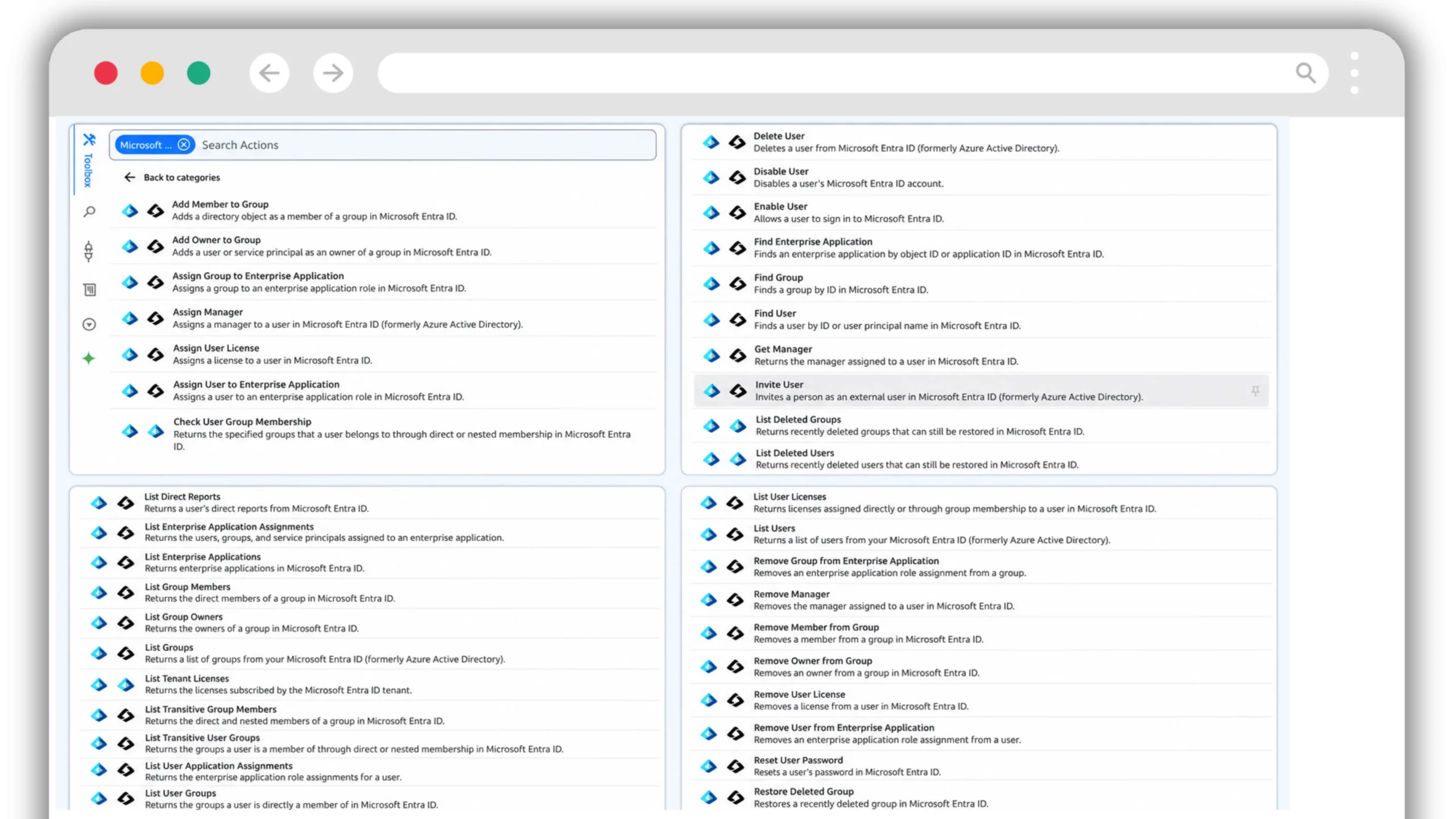
Zenphi expanded its Microsoft Entra ID action set in September 2026. The October action-menu screenshot below visibly lists 38 named actions, including Get Manager, Assign User License, Remove User License, group-owner operations, enterprise application operations and directory lookups. This is a count of actions visible in that screenshot, not a claimed total of every action available across every Zenphi connection. See the September 2026 product update.
| IT administrative capability | Zapier: Google Workspace Admin | Zapier: Microsoft Entra ID | Zenphi: Google Workspace | Zenphi: Microsoft Entra ID |
|---|---|---|---|---|
| Create, find and update users | Native | Native | Native | Native |
| Disable / suspend users | Native suspend | Native disable | Native | Native disable / enable |
| Manage group membership | Native | Native | Native | Native, including owners |
| Get user's manager for approvals | No dedicated manager action listed | No dedicated Get Manager action | Native Find Manager (via Directory) | Native Get Manager |
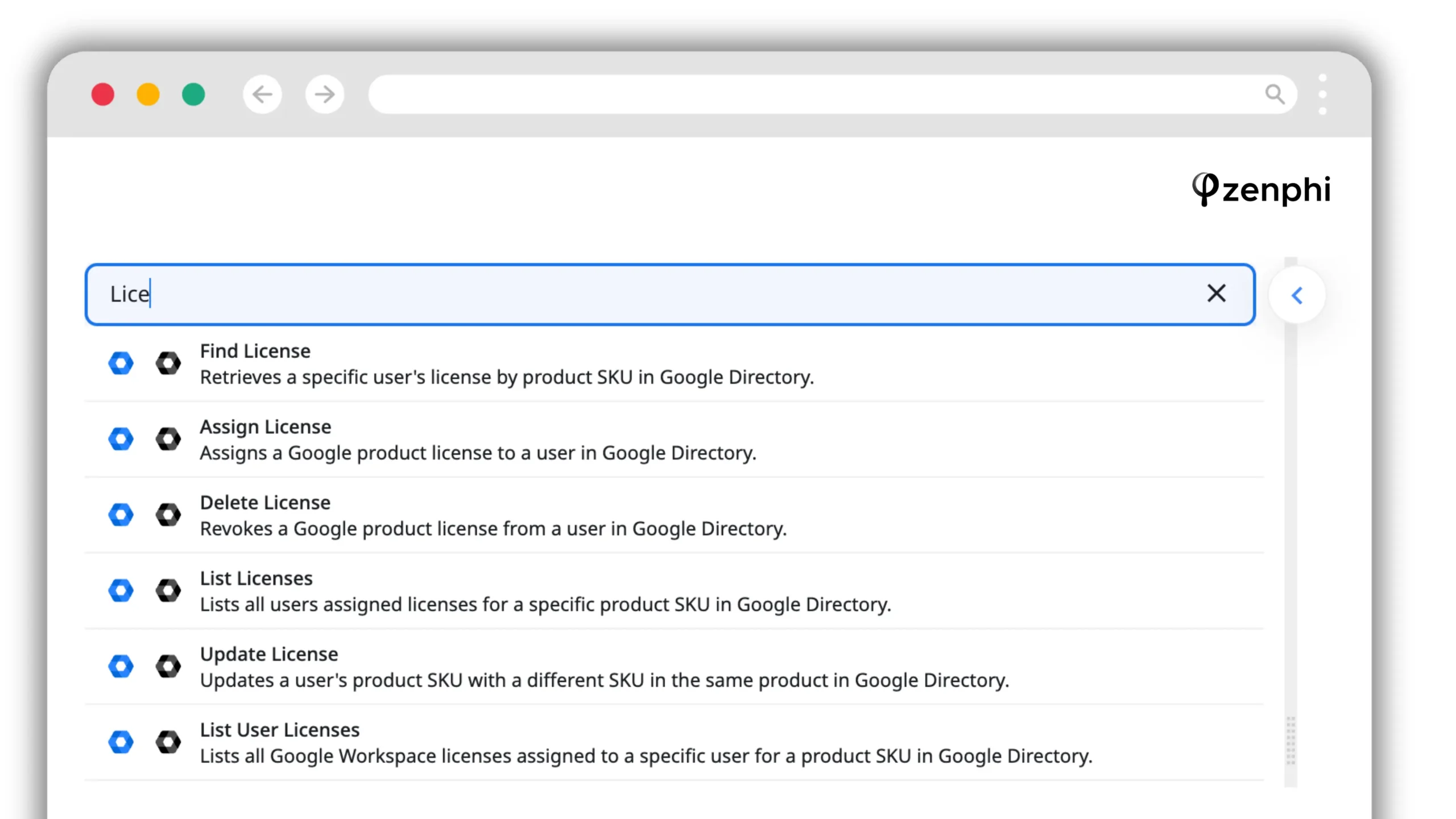
| Assign / revoke user licences | Native | No dedicated action listed | Native assign / remove / list | Native assign / remove / list |
| Assign directory / admin roles | Native Google admin roles | No dedicated action listed | Native Google admin operations | Native directory-role lookups; verify write coverage |
| Enterprise application assignments | Not applicable | No dedicated action listed | Not applicable | Native assignment and removal |
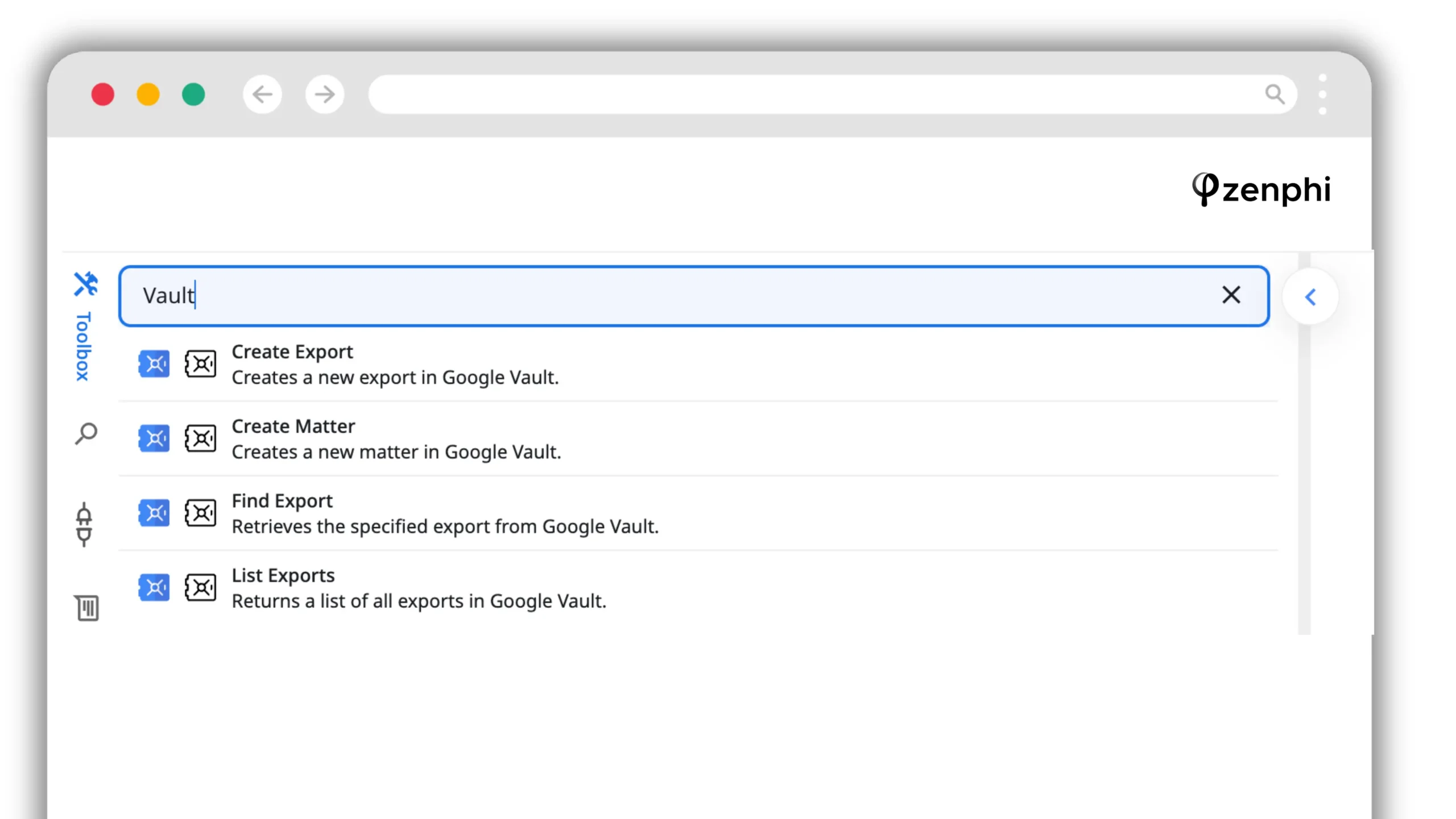
| Google Vault operations | No dedicated Google Vault integration identified | Not applicable | Dedicated Google Vault actions | Not applicable |
| Authenticated raw API requests | API Request (Beta) | API Request (Beta) | API / connector options | API / connector options |
Native means a dedicated named action, not merely an operation that could be implemented through an API. This comparison covers the published Zapier action catalogs and the supplied Zenphi action screenshots, reviewed October 2026. Google and Microsoft operations are not identical; "not applicable" rows are not shortcomings.
Google Vault and Google Workspace licences also matter
Zapier now has Google Workspace licence assignment and revocation, so saying it cannot manage Google licences would be inaccurate. Zenphi also provides native Google Workspace licence actions. The sharper distinction is Google Vault: Zenphi exposes dedicated Vault actions in its workflow builder, whereas a dedicated Google Vault integration is not present in Zapier's published app catalog checked for this comparison.
The 10 alternatives in detail
Make
Make is the closest like-for-like alternative for teams that like visual automation but want more granular control over data flow. Its scenario builder is strong for branching and iteration.
Where it is stronger than Zapier. Visual control over complex scenarios and a different operation-based pricing model.
Where it falls short for IT. Deep tenant administration still depends on connector/API coverage rather than a Google-admin-native operating model.
n8n
Open-source workflow automation with self-hosting and strong extensibility. It is a serious option where infrastructure control, data residency or custom integrations are more important than handing ownership to non-technical administrators.
Where it is stronger. Control, extensibility and self-hosting.
Where it falls short. The operational burden becomes yours: upgrades, uptime, backups and the governance model you build around it.
See the n8n alternatives comparison for a wider view.
Zenphi
Zenphi is a no-code process automation platform for IT, HR, Finance, Compliance and cross-functional operations. Its strongest suite is in IT operations automation, thanks to deep native Google Workspace administration and Microsoft Entra ID actions, including Get Manager, user licence management, group ownership and enterprise application assignments. It can also connect to complex enterprise systems through native integrations, APIs and custom execution steps. The platform brings these integrations into end-to-end, governed workflows rather than isolated point-to-point automations.
Where it stands out for complex process automation
Google Workspace and Admin actions are first-class workflow steps. Approval routing can be sequential, parallel or conditional, with reminders, expiry, delegation and escalation. Workflow history retains the request, decisions and downstream actions instead of requiring an administrator to reconstruct the process from several systems.
Bulk processes can iterate through Google Sheets or other collections with Foreach and Parallel Foreach, and pricing does not increase per workflow run or per directory user. That makes Zenphi particularly relevant for high-volume operations with thousands of flow runs: onboarding, offboarding, licence management, access reviews, account changes and other recurring administrative processes.
Its expanded Entra ID actions, including those shipped in September 2026, cover detailed identity operations beyond basic create/update user. Mixed environments are supported through first-class actions for Microsoft services including Entra ID, OneDrive, SharePoint, Teams and Outlook. That matters for holding companies, acquired businesses and migrations where Google Workspace and Microsoft 365 coexist for years rather than weeks. A single workflow can therefore coordinate Google Workspace administration, Microsoft administration and actions in external business systems without splitting the process across separate automation stacks.
Beyond IT, Zenphi automates employee onboarding and HR requests, Finance approvals and document processes, and Compliance reviews and evidence collection. AI can be incorporated into these workflows with controlled model selection, defined prompts, approval checkpoints, usage visibility and cost governance, while deterministic workflow steps execute the actions that must remain predictable.
Where it is not the right fit
A two-step automation that copies a form response into a CRM or posts a notification from a long-tail SaaS product does not need this level of workflow structure. Zapier's application catalogue is far larger, and for lightweight connector automation it can be the faster choice.
Activepieces
Open-source automation with cloud and self-hosted deployment. Current Activepieces documentation lists more than 760 pieces and includes human-input and approval building blocks.
Where it is stronger. Open-source deployment with a lighter adoption path than many developer-first tools.
Where it falls short. Its application catalogue and ecosystem are much smaller than Zapier's, so long-tail integration coverage remains a real trade-off.
Workato
Enterprise iPaaS with strong integration, transformation, error handling and governance. It makes sense when integration itself is the enterprise problem rather than one Google Workspace process.
Where it is stronger. Enterprise integration governance, transformation and reliability controls.
Where it falls short for this audience. Cost, platform weight and specialist ownership can be disproportionate when most automation lives in Google Workspace.
See Workato alternatives.
Tray.io
API-led integration positioned between no-code automation and enterprise iPaaS. It suits teams with engineering capacity that want stronger developer tooling without committing to the heaviest platforms.
Where it is stronger. Flexible API-led integration and enterprise security/compliance tooling.
Where it falls short. More technical ownership than business-user automation tools, with Google administration still approached through integration primitives.
Power Automate
Microsoft's automation platform is the natural fit for Microsoft-first estates. Its strongest depth is across Microsoft 365, Dynamics and Azure, and it includes mature approval capabilities.
Where it is stronger than Zapier. Microsoft-native depth and governance, especially where licensing is already in place.
Where it falls short. Google Workspace is connector-based rather than the centre of the platform.
For Google Workspace teams, compare Power Automate for Google Workspace.
Okta Workflows
Workflow automation anchored in identity events. It is most relevant when Okta is already the identity provider and joiner-mover-leaver automation should begin with Okta lifecycle changes.
Where it is stronger. Identity is the native event model rather than another connected application.
Where it falls short. It is a narrower choice if Okta is not the control plane, and downstream Google depth depends on the available actions and APIs.
BetterCloud
SaaS management and lifecycle automation across a broad application estate. BetterCloud makes sense when IT's main requirement is managing users, access and lifecycle events across many SaaS products.
Where it is stronger than Zapier. Purpose-built SaaS operations, lifecycle management and security administration.
Where it falls short. It is less of a blank-canvas process automation platform, and commercial terms scale differently from flat organisation-level workflow pricing.
See Zenphi vs BetterCloud and the broader BetterCloud alternatives roundup.
Apps Script
Google's scripting platform offers deep control and direct access to Google services and APIs without buying another workflow product. For developers and technically mature admins, it remains powerful.
Where it is stronger. Code-level freedom, Google-native execution and no separate software licence.
Where it falls short. Your team owns the code, state, approvals, retries, evidence model, testing and long-term maintenance.
See Google Apps Script alternatives and Zenphi vs Apps Script.
Which to choose
Keep Zapier. It is still an excellent fit for lightweight automations and long-tail SaaS integrations.
Make is the closest mainstream alternative, with detailed visual control over branching and iteration.
n8n for engineering-led teams, or Activepieces for a lighter open-source route.
Workato or Tray.io when the centre of gravity is integration engineering itself: complex transformation, API orchestration and broad enterprise-system connectivity. Zenphi can also connect complex systems, but its stronger fit is when those connections are part of a governed business process, including IT, HR, Finance or Compliance.
Power Automate for organisations deeply standardised on Microsoft licensing and tooling; Zenphi for no-code, cross-platform IT processes combining first-class Entra ID and Google Workspace administration, manager approvals and an end-to-end decision trail.
Okta Workflows when joiner-mover-leaver events start from Okta and identity is the centre of the architecture.
BetterCloud when the job is managing users and access across a large SaaS estate using an IT-management platform.
Apps Script when development capacity and long-term script maintenance are acceptable trade-offs.
Zenphi when the work includes thousands of flow runs, user lifecycle, Google Directory lookups, bulk administration, access changes, policy-driven routing, approvals, audit evidence, or combined Google Workspace + Microsoft environments. Zenphi can connect complex systems as part of the same process; its advantage is orchestrating complete, governed business processes, with deep IT admin actions and controlled AI usage, without per-user or per-run pricing.
Frequently asked questions
Will upgrading to Zapier Professional unlock its missing Entra ID Get Manager action?
No. In a documented test, Zapier Copilot proposed a Find User's Manager action and directed the user to upgrade to Professional. When asked to verify the action, Copilot acknowledged that no such direct Entra ID action existed. A paid plan may enable use of the premium Entra ID integration, but it does not add an unlisted native Get Manager action. An authorised Microsoft Graph request may provide an alternative.
Does Zapier have a Get Manager action for Microsoft Entra ID?
No dedicated Get Manager action is listed in Zapier's Microsoft Entra ID integration. Its Find User action is different. A Microsoft Graph request may be possible using API Request (Beta), with appropriate permissions. Zenphi offers a first-class Entra ID Get Manager action that can be used to route approvals.
Can Zapier manage Microsoft Entra ID licences and enterprise application assignments?
Zapier's published Entra ID connector does not list dedicated user licence assignment or enterprise application assignment actions. Its API Request (Beta) may allow additional Microsoft Graph operations. Zenphi's Entra ID action menu includes Assign User License, Remove User License, List User Licenses, Assign User to Enterprise Application and Remove User from Enterprise Application.
Is Zenphi a Zapier alternative for both Google Workspace and Microsoft 365 IT teams?
Yes. Zenphi is a no-code process automation platform for IT, HR, Finance and Compliance. Its strongest IT operations capabilities come from first-class Google Workspace and Microsoft Entra ID actions. It also supports governed, cost-controlled AI within end-to-end workflows. Zapier remains appealing for simple integrations and a broader app catalogue.
Does Zapier support Google Vault automation?
A dedicated Google Vault integration was not identified in Zapier's public app catalogue during this review. Zenphi provides dedicated Google Vault actions. API-based approaches may also exist, but are not equivalent to ready-made workflow actions.
What is the best Zapier alternative for IT teams?
It depends on the operating model. Make is closest to Zapier for general visual automation; n8n suits self-hosting; Workato and Tray.io address enterprise integration; Power Automate is strongest in Microsoft-first estates; Okta Workflows is identity-led; BetterCloud focuses on SaaS lifecycle management; Apps Script provides code-level Google control; and Zenphi combines broad business process automation with deep native Google Workspace and Entra ID administration and governed AI.
Why do IT teams move away from Zapier?
The reasons have changed as Zapier has added IT features. Current friction is less about whether Zapier can perform any administrative action and more about first-class Google Admin depth, bulk approval patterns, evidence requirements, governance architecture and task-based usage at operational volume.
Does Zapier have approval workflows?
Yes. Zapier's Human in the Loop tool includes a Request Approval action on paid plans, with reminders and timeout behaviour. Zapier documents approve/reject events in its Team and Enterprise audit log. One important limitation for bulk IT processes is that Human in the Loop cannot be added within or after a Looping step.
Can Zapier manage Google Workspace users and licences?
Yes, to a meaningful extent. Zapier's current Google Workspace Admin integration supports user and group actions, roles, suspension and deletion, plus licence assignment and revocation. It also includes an authenticated API Request action for operations outside the named action list. Teams should compare the number of first-class actions they need against how much custom API work they are comfortable owning.
How does Zapier task pricing affect IT automation?
Current Zapier plans do not charge tasks for triggers or several built-in tools such as Filter, Paths, Delay and Looping. Successful external actions do consume tasks, and AI, code or connector usage can have different task rates. For high-volume administration, estimate usage from the actual billable actions and branch outcomes rather than counting every step in the visual workflow.
Is Zapier HIPAA compliant?
Zapier's current data-privacy documentation says use of regulated healthcare and medical data, including PHI, is not supported and that Zapier cannot sign a Business Associate Agreement. Organisations handling PHI should confirm current contractual terms directly before selecting any automation platform.
Can Zapier use a bring-your-own-model setup?
Yes. Zapier now documents Bring Your Own Model capabilities for organisations, including routing AI processing through customer-controlled infrastructure such as AWS Bedrock. That is a material change from older comparisons that described Zapier as unable to support BYOM.
Should we replace Zapier entirely?
Usually not. Zapier remains useful for simple automation and its very large app catalogue. Many IT teams can keep it for lightweight connector work and use another platform for the processes that require deeper administration, lifecycle orchestration, complex approval routing or a stronger decision trail.
Related reading
Workato Alternatives: 11 Competitors Compared
Enterprise iPaaS, no-code automation, platform-native tools and specialist alternatives.
Read comparison →BetterCloud Alternatives: 8 Options Compared
Compare SaaS management, lifecycle automation and Google Workspace administration approaches.
Read comparison →Best n8n Alternatives: Free, No-Code and Enterprise
Options for teams that want automation without owning a self-hosted n8n deployment.
Read comparison →Power Automate for Google Workspace
Compare Microsoft-native automation with a Google Workspace-native operating model.
Read comparison →Google Admin Tasks Automation
Automate recurring Google Workspace administration, lifecycle and access-management processes.
Explore pillar page →BetterCloud vs CloudM vs Zenphi for Google Workspace Offboarding
Compare template-led lifecycle management with fully custom offboarding workflows.
Read comparison →Running Zapier for IT work and hitting the ceiling?
Bring one process your team currently handles by hand — ideally the one with the awkward approval, user-lifecycle or Google Admin path — and map how it would work as a governed workflow.
Book a build sessionProduct capabilities were reviewed against public Zapier documentation and supplied Zenphi product screenshots in October 2026. Pricing, packaging, compliance terms and beta features can change; confirm commercial and legal terms directly with each vendor before purchase or regulated-data use.


