
We've compared the top 10 AI automation tools in 2026, including their strengths, weaknesses, and best-fit use cases — with a special focus on Google Workspace-native automation, Microsoft 365, and mixed environments.
What's in this guide
AI workflow automation has become one of the most impactful trends of 2026 (read more on AI workflow automation trends this year). As businesses face pressure to scale faster, cut costs, and adapt to new compliance requirements, AI-driven automation is no longer a "nice to have" — it's essential.
Yet, not all platforms are created equal. Some are built for lightweight tasks, others for enterprise-grade orchestration.
We've compared the top 10 AI automation tools in 2026, including their strengths, weaknesses, and best-fit use cases — with a special focus on Google Workspace-native automation, Microsoft 365, and mixed environments.
How we compared them: every tool below is scored against the same five criteria — ecosystem fit, security & compliance, pricing model at scale, human-in-the-loop support, and ease of use for non-developers (the same five criteria explained in the "How to Choose" section further down). Zenphi is on this list because we built it, and we've tried to stay upfront about that: where a competitor genuinely wins on a dimension — Zapier's connector library, or Make and n8n's cost at very high volume — we say so rather than paper over it.
The Top 10 AI Automation Tools
Zenphi
Best for: Google Workspace-first teams and mixed Google/Microsoft environments that need secure, end-to-end AI workflow automation.
Zenphi is a Google Workspace-native, no-code automation platform with broad capabilities for Microsoft-based environments as well. It is designed for embedding AI into IT Ops, Finance, HR, and other operational workflows while keeping the surrounding process governed and predictable. Zenphi's September 2026 update added 30 new Microsoft Entra ID actions, expanding its fit for mixed estates and for teams migrating from Microsoft to Google while keeping part of their process landscape in Microsoft.
Pros
- ZAIA — Zenphi AI Assistant that builds workflows from plain language descriptions
- HIPAA-compliant, enterprise-grade security
- Native Google Workspace integrations (Gmail, Drive, Sheets, Admin, Docs) plus Microsoft actions across Entra ID, Outlook, Teams, SharePoint, OneDrive, Excel Online, and related services
- Human-in-the-loop workflows with AI embedded where it adds value
- Tier-based pricing with workflow packages and no per-user or workflow-run fees, so automation costs do not automatically rise with headcount or every execution
Cons
- Best suited for operational workflows; less focused on marketing apps compared to Zapier
- Learning curve for teams unfamiliar with workflow orchestration
"Zenphi is used to automate multiple approval and self-service processes in Gordon Food Service. Just several months after implementation, our support ticket volume was reduced by 83%." — Jeff Johnson, Support Team, Gordon Food Service. More real results.
Use cases
- AI Workflows For Finance & IT
- AI For IT Ops Automation
- Inbox Automation — extracting data from incoming emails and/or attachments, categorizing, storing in the databases and routing for the approvals
- AI-powered HR Workflows — CV screening, communication, employee onboarding and offboarding, leave requests approvals and more
- AI-powered Workflows for Customer Success & Support
- Legal Documents processing
- AI-Powered Sales Workflows — prospect onboarding, NDA and agreements generation, pipeline analysis, meeting reports generation, automated follow up emails and more
AI Workflows Supported
- Document AI: Extracting key fields from invoices, contracts, or student onboarding forms
- Generative AI: create, classify, update content, databases, images
- Classification & Routing: Sorting Gmail and Oitlook attachments or incoming support tickets with AI
- Sentiment Analysis & Summarization
- Extracting structured data from emails with built-in AI text agent (select from Gemini, OpenAI, Claude)
- AI + Human-in-the-loop: Exceptions intelligently escalated for review
Pricing: Tier-based plans that include a package of workflows, with the effective price of a single workflow as low as $50/month. No per-user or workflow-run fees.
Zapier
Best for: Connecting apps with some AI integrations, but not true AI-first workflows.
Zapier remains the go-to for connecting thousands of SaaS tools. It has started to add AI features via OpenAI integrations and "AI actions," but these are largely add-ons.
Pros
- Huge library of app integrations
- Easy to start with minimal setup
- Large user community and templates
Cons
- Limited support for complex, multi-step workflows
- Expensive at scale — pricing grows with task volume
- No enterprise-grade compliance — Zapier confirms it does not support HIPAA
Zapier is the fastest way to wire up a single trigger-to-action automation between two apps you already use. Once a workflow needs multiple steps, conditional logic, or an audit trail a compliance team can review, that simplicity turns into a ceiling.
Use cases
- Marketing campaign integrations
- Simple notifications or file movements
- Lightweight business workflows
AI Workflows Supported
- Auto-generating email responses using OpenAI models*
- Classifying form inputs with AI before routing*
Pricing: Free tier available. Paid plans start around $19.99–29.99/month depending on plan and billing cycle — Zapier's task-based pricing changes often, so check current rates — and costs escalate quickly with volume.
* Auto-generating email responses using Gemini, OpenAI, or Claude, as well as classifying form inputs with AI before routing are also supported by Zenphi. Click here to learn more.
Make (formerly Integromat)
Best for: Visual automation enthusiasts who need multi-step flows.
Make is popular for its visual workflow builder and automation assistant that allows drag-and-drop creation of complex automations.
Pros
- Flexible and visual design interface
- Supports multi-step and branched workflows
- Strong community templates
Cons
- Steeper learning curve than Zapier
- Can be fragile with larger workflows
- Limited compliance certifications
Make trades Zapier's one-click simplicity for a visual canvas: routers, filters, and branching logic are easier to see and debug once a workflow has more than two or three steps. The tradeoff is a steeper first-time learning curve.
Use cases
- Connecting SaaS apps for operations and marketing
- Automating file and data sync across cloud tools
AI Workflows Supported
- Summarizing customer support requests with AI before sending to a team*
- Extracting structured data from emails with an AI connector**
Pricing: Free plan available. Paid plans start around $9–10/month (billed monthly), usage-based.
* Summarizing support requests with AI can also be done in Zenphi. Click here to learn more.
** You can automatically extract structured data from emails with Zenphi. No connector is needed. Click here to learn more.
Google Workspace Studio
Best for: Personal use.
Google Workspace has finally launched its own automation solution — Google Workspace Studio. It's a great tool that allows you to build simple automations and AI agents for Google — but for personal use only.
Pros
- Native for Google Workspace
- Very easy to set up — Gemini can even build the backbone of your workflow for you, just describe what you want to achieve in plain English
- Starts operating instantly
Cons
- Still a very limited number of triggers — you can't trigger a workflow from outside of Google Workspace
- Very limited number of actions and integrations
- Limited to your personal Workspace — you can't perform actions on other employees' Drives or files
For more information about Google Workspace Studio features and limitations, read this article. We have also put together playlist comparing Google Workspace Studio to Zenphi: how they handle document workflow on Drive, document generation, Google Meet automation and more.
Use cases
- Notify me when an email arrives from...
- Post to the chat when a row in a Sheet changes...
AI Workflows Supported
- Summarization
- Data extraction (with limitation)
Pricing: Included in Google Workspace plan.
Microsoft Power Automate
Best for: Teams standardized on Microsoft that want the most native automation option inside the Microsoft ecosystem.
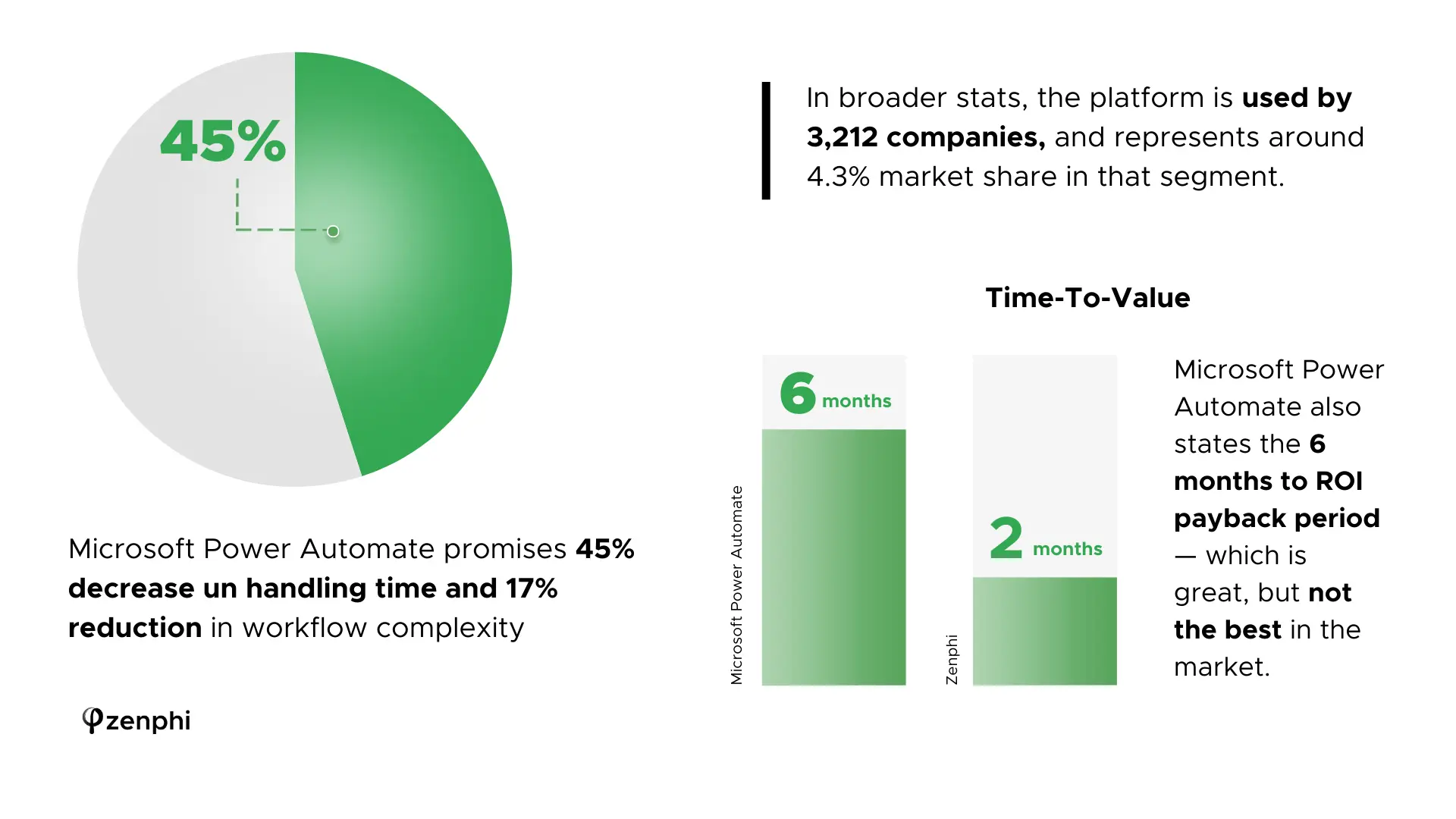
In 2026 Microsoft has doubled down on Copilot integrations, embedding AI directly into Power Automate flows. For teams standardized on Microsoft, Power Automate remains the most native option. For mixed Google/Microsoft environments, or organisations migrating to Google while retaining Microsoft processes, Zenphi is also a valid option because it combines deep Google Workspace automation with native Microsoft actions.
Pros
- Deeply embedded into Microsoft 365, strong RPA
- Combines cloud flows (SaaS/API automation) and desktop flows (legacy Windows apps, SAP, mainframe terminals) in one platform
Cons
- Complex to deploy, tied to Microsoft stack
- Licensing is easy to trip up: adding a single premium connector (Dataverse, Salesforce, SQL Server) to a flow requires a premium license for every user who triggers it
AI Workflows Supported
- AI-based document classification in SharePoint
- AI-generated summaries of Teams or Outlook threads
Pricing: Premium (per user) plans from $15/user/month; unattended RPA and add-ons (AI Builder, process mining) are priced separately. See our Power Automate pricing guide for a closer breakdown.
Workato
Best for: Enterprises embedding AI into complex system integrations.
Workato is positioned as an enterprise integration + AI orchestration platform. It supports custom AI models, but implementation requires technical expertise.
Pros
- Enterprise-grade security, advanced AI support
Cons
- Expensive, requires technical implementation
AI Workflows Supported
- AI-driven lead scoring in CRM
- Document review and classification in procurement workflows*
Pricing: Enterprise-level, custom quotes. If Workato is on your shortlist, see our Workato alternatives comparison.
* Document review and classification in any operational workflow is also available via Zenphi. Click here to learn more.
Operationalize AI without losing control of the process or the cost
Zenphi lets teams embed AI inside operational workflows only where it adds value, while keeping deterministic steps deterministic. Teams can govern model choice, prompts, approvals and exception handling, and control how AI is used so token costs do not scale uncontrollably with every step in the process.
UiPath
Best for: RPA-driven AI workflows in legacy environments.
UiPath leads in Robotic Process Automation (RPA) and has layered in AI capabilities for unstructured data and decisioning.
Pros
- Strong for enterprises with legacy/on-prem systems
- Deepest RPA ecosystem on the market — built for high-volume, stable processes (e.g. thousands of invoices through the same ERP)
Cons
- High complexity and cost, less suited for cloud-native teams
- Relies on fixed UI selectors rather than visual interpretation — a bot can break when a website or app changes its layout, requiring manual rework
AI Workflows Supported
- Invoice data capture with AI OCR*
- Automating ERP tasks with AI validation
Pricing: Enterprise-level, custom quotes.
* Invoice data capture and invoice processing automation with AI OCR is also available via Zenphi. Click here to learn more.
n8n
Best for: Developers and freelancers building custom AI workflows in open-source. If you're not a developer, consider one of n8n alternatives.
n8n is an open-source workflow tool that allows embedding AI APIs directly into flows.
Pros
- Open-source, flexible, self-hostable
- Native JavaScript/Python code nodes for arbitrary custom logic, on top of ~400 built-in app integrations
Cons
- Requires technical skills, compliance and security is your responsibility
- Not fully open-source — runs on a "fair-code" Sustainable Use License, which restricts using it to build a competing product or offer it as a hosted service without an enterprise license
AI Workflows Supported
- Build custom AI agents*
- Integrate LLMs for classification or enrichment
Pricing: Free self-hosted (Community Edition, no execution limits); cloud Starter from $20/month billed annually (~$24/month billed monthly) — see n8n.io/pricing for current tiers.
* Zenphi's automation platform allows you to build a wide range of AI agents to help operationalize AI for your business. Click here to access dozens of use cases and success stories.
Automation Anywhere
Best for: Large enterprises combining RPA and AI.
Automation Anywhere is an RPA platform that integrates AI for intelligent document processing and decision-making.
Pros
- Enterprise focus, strong compliance
- Cloud-native architecture (UiPath historically leaned on-prem) — easier to stand up without dedicated RPA infrastructure
Cons
- Expensive, requires consultants for rollout
- That same cloud-native design is a drawback for organizations with strict data-residency rules that require fully on-prem deployment
AI Workflows Supported
- Automated claims or invoice handling
- AI-assisted bot orchestration
Pricing: Enterprise-level, custom pricing.
Kissflow
Best for: Teams digitizing workflows with limited AI depth.
Kissflow positions itself as a no-code workflow platform. It has some AI connectors but lacks embedded AI or advanced document workflows.
Pros
- Easy-to-use builder, good for SMBs
Cons
- Weak AI capabilities compared to others; priced as a flat platform license rather than per-seat, which is expensive for teams that only need a handful of users
AI Workflows Supported
- Simple form approvals with AI-assisted routing
Pricing: Not sold per-seat — Kissflow's Basic plan is a flat platform license running roughly $1,500–2,500/month for up to 50 users; Enterprise is custom. See our Kissflow pricing guide for more detail.
Verdict: Which AI Workflow Platform Fits Best in 2026?
- For Google Workspace-first teams: Zenphi combines deep Workspace actions with governed AI workflow automation.
- For teams fully standardized on Microsoft: Power Automate is the most native option and integrates Copilot deeply.
- For mixed Google/Microsoft environments, or teams migrating to Google while keeping Microsoft processes: Zenphi is a valid choice, with native Microsoft actions and expanded Entra ID coverage.
- For lightweight AI tasks: Zapier and Make can work but lack enterprise readiness.
- For document-heavy workflows: Zenphi and UiPath excel.
- For regulated industries where compliance is important: Zenphi and Automation Anywhere are better suited.
How to Choose the Right AI Workflow Automation Tool in 2026
With so many platforms available, it's easy to get lost in feature lists. Based on conversations with IT and operations leaders, here are the key selection criteria that matter most in 2026:
Ecosystem Fit
- Does the platform integrate natively with your core environment (Google Workspace, Microsoft 365, Salesforce, etc.)?
- Native integrations reduce friction and improve reliability.
Security & Compliance
- Are certifications like HIPAA, SOC 2, or GDPR compliance in place?
- Critical for finance, healthcare, education, and other regulated industries.
Scalability & Pricing Model
- How does cost grow as you expand?
- Platforms like Zapier or Kissflow can get expensive quickly with per-seat or per-task pricing, while Zenphi uses tier-based workflow packages with no per-user or workflow-run fees.
Human-in-the-Loop Support
- Can workflows intelligently route exceptions for review instead of breaking?
- This balance between automation and oversight builds trust in AI-driven processes.
Ease of Use vs. Complexity
- Can business users launch workflows, or will you need dedicated developers or consultants?
- Is it low-code or no-code?
Templates: Yes or No?
Many users ask if having workflow templates is important. We don't believe so. And here's why.
Your business operations are what make you unique — they're your competitive advantage. Forcing them into pre-built templates strips away that differentiation. It's far better to design workflows that reflect your best practices, then integrate AI to amplify them. With Zenphi's AI Workflow Builder, even the "blank canvas" problem disappears — you can describe what you need in your native language and get a tailored workflow framework to start from.
FAQs About AI Workflow Automation Tools For 2026
What makes an automation tool "AI-first"?
It doesn't just connect to AI models — it embeds AI into workflows for classification, data extraction, and exception handling.
Which AI workflow tool is best for Google Workspace?
Zenphi is Google Workspace-native, with deep actions across Gmail, Drive, Docs, Sheets and Google Admin. It also supports Microsoft-based and mixed environments, including expanded Entra ID automation added in September 2026.
Can Zapier or Make handle AI workflows?
Yes, but only through connectors to external AI models. They don't offer embedded, compliant AI capabilities.
What's the difference between RPA and AI workflow automation?
RPA (like UiPath) automates repetitive screen tasks. AI workflow automation combines deterministic logic with AI for smarter, adaptive processes.
Read More On AI Workflow Automation
20 Use Cases Of Autonomous AI Agents On Google
20 real-world success stories of companies building autonomous AI agents using Google Workspace tools.
Read MoreAI For IT Ops Automation
Five practical ways AI is already improving IT operations — and how teams can use them across Google Workspace and connected environments.
Read More →7 Processes You Can Automate With AI Today
Top 7 AI-driven processes you can automate today to improve efficiency, reduce costs, and scale operations.
Read More →Game-Changing AI Workflow Automation Examples
Ten game-changing AI workflow automation examples that your team can and should implement this year.
Read More →Case Study: AI For Document Validation
Learn how a camp saves 2 weeks for the core staff, allowing them to stay focused on what really matters.
Learn More →Need AI workflow automation without runaway token costs?
Zenphi combines Google Workspace-native automation with Microsoft capabilities and lets teams place AI selectively inside governed workflows, with human approvals and controls around model usage, prompts and spend.


