
Workato publishes no pricing. Here is what companies report paying, what actually drives the quote, which costs sit outside the licence, and how the economics compare with Power Automate and Zenphi.
Key takeaways
- Workato publishes no pricing at all. Every figure on this page comes from community reports and procurement data rather than from Workato, and should be treated as indicative.
- Entry-level credit tiers are reported at around $79 per month. That figure bears little relationship to what enterprise buyers report paying.
- Enterprise deployments are reported in the range of $27,000 to over $150,000 per year, from Reddit discussions and procurement benchmarking data, updated for 2026.
- The unit of pricing is the recipe and the credit, not the user. A recipe is a single automation. Cost scales with how many automations you run, how many systems they connect to, and how much they process — rather than with headcount.
- The quote is shaped by four things: recipe volume, connector tier, environments, and task or transaction throughput. Understanding these before the first sales conversation is the difference between a quote you can assess and one you can only accept.
- Total cost of ownership runs well above the licence line, because Workato deployments generally require dedicated platform expertise to build, govern and maintain.
What's in this guide
Workato publishes no pricing. There is no list page, no self-serve tier and no public rate card — every deployment is quoted against its specific workload.
What exists instead is what buyers report. Community discussions and procurement benchmarking data put entry-level credit tiers at around $79 per month, and enterprise deployments in the range of $27,000 to over $150,000 per year, updated for 2026. The spread between those two figures is roughly two orders of magnitude, and where an organization lands within it depends on variables that are worth understanding before the first sales conversation.
None of these numbers come from Workato. They are reported figures, and they should be treated as indicative rather than as a quote. That they are the best available answer is itself the point: it is why "how much does Workato cost" is a harder question than it should be, and why most of the public discussion happens in community threads rather than on vendor pages.
What can be described precisely is the pricing model: what Workato charges for, which decisions move the number, and which costs appear after the licence is signed. This page covers the structure, the costs buyers most often miss, a worked breakdown of total cost of ownership at mid-size, the scenarios where the model becomes disproportionately expensive, and how the economics compare with Power Automate and with Zenphi.
How Workato pricing is structured
Workato prices the automation rather than the person. Five variables drive the quote.
Credits and consumption
- Entry-level arrangements are reported as credit-based, consumed as automations run. This is what produces the ~$79 per month figure users report.
- Credit-based packaging suits low, predictable volume. It becomes difficult to forecast once automation spreads across functions, which is where most organizations move to a larger negotiated agreement.
Recipes
- A recipe is a single automation — a trigger plus the actions that follow it. Workato licences are sized around how many recipes you run concurrently.
- This is the core difference from per-user platforms. A recipe used by five people and a recipe used by five hundred cost the same, which is favourable for widely-shared workflows and unfavourable for organizations running many low-volume automations.
- Recipe count is the number most likely to grow after signature, because successful deployments spawn new automations.
Connections
- Each connected system counts. A recipe touching Salesforce, NetSuite and Slack consumes three connections.
- Enterprise connectors for systems like SAP, Oracle and Workday are generally treated differently from standard SaaS connectors, and this distinction affects the quote.
Environments
- Development, test and production environments are licensed separately in most configurations.
- Organizations with proper release management pay for that discipline. Teams building directly in production avoid the cost and carry the risk instead.
Tasks and throughput
- High-volume workloads — bulk data movement, high-frequency triggers, large batch jobs — affect sizing beyond recipe count alone.
- This is where quotes diverge most sharply between two organizations running the same number of recipes.
Workato also offers workspace-based arrangements for larger deployments, where multiple business units operate semi-independently under one agreement.
Costs that appear after the licence
The four variables above determine the licence. The costs below determine the real total.
Platform expertise
Workato is an enterprise integration platform, and building on it competently is a specialist skill. Most deployments of any size involve either dedicated internal capability or a partner.
This is the single largest line outside the licence, and the one most often missing from an initial business case.
Implementation and onboarding
Workato offers paid onboarding and professional services. Larger deployments frequently engage an implementation partner for the first wave of recipes.
Budget for this as a project cost, not an incidental one.
Recipe growth
Because pricing is tied to recipe count, a successful deployment increases its own cost. Teams that automate well find themselves renegotiating at renewal.
Model the second-year recipe count, not the first-year one.
Governance and maintenance
Someone has to own recipe dependency management, version control across environments, and error monitoring. A user quoted in our Workato alternatives comparison describes the difficulty directly: once workflows are interconnected, working out what breaks when something changes is hard, and there is limited dependency visualization to help.
That maintenance burden is a staffing cost, and it scales with the estate.
A worked example of total cost of ownership
The structure below is illustrative rather than a quote. A deployment of this shape falls within the $27,000 to $150,000+ annual range enterprise buyers report, and where it lands depends on the variables above.
500-employee professional services firm
Automation spans HR (onboarding, holiday requests, appraisals), finance (expense claims, purchase orders) and IT (access requests, ticketing). Most workflows connect to internal systems, but several touch Salesforce, NetSuite and DocuSign.
What shapes the quote
- Around 30–40 recipes in production, covering the three functional areas, with more added each quarter as the deployment matures
- Eight to ten connections, including at least two enterprise-tier systems
- Three environments — development, test and production — to support controlled release
- Moderate throughput, with two or three high-volume recipes handling bulk finance data
Costs not on the licensing invoice
- Platform ownership. For a deployment of this size, typically 0.5–1 FTE of dedicated Workato capability, whether internal or partner-supplied
- Initial implementation. A first wave of production-ready recipes across three functions is a project, not a configuration exercise
- Ongoing build. Each new automation needs someone who knows the platform
- Recipe growth at renewal. A deployment adding recipes each quarter arrives at renewal with a materially larger footprint than it was quoted for
The fully-loaded cost for a deployment of this size commonly runs several times the licence line, driven by people rather than by Workato's own rates. A licence at the middle of the reported range carries a fully-loaded total well beyond it once platform ownership, implementation and ongoing build are counted.
This is true of any enterprise integration platform. What is specific to Workato is that the recipe-based model means the licence itself also grows with success.
Where Workato's pricing model doesn't fit
Workato's pricing suits the pattern it was built for: a moderate number of high-value, widely-shared integrations between enterprise systems, run by a team with platform expertise. For that pattern, the economics are defensible.
The model becomes disproportionately expensive in three situations.
Many small automations
Recipe-based pricing rewards a few large automations and penalises many small ones.
Organizations whose automation need is dozens of modest workflows — an approval here, a notification there, a provisioning task somewhere else — pay the same per recipe as they would for a business-critical integration.
This is the most common mismatch, and it usually surfaces six months in, once the team has discovered how many small processes are worth automating.
Work concentrated inside one platform
Workato reaches Google Workspace and Microsoft 365 through standard connectors, which limits available actions to what the connector exposes.
Teams whose automation lives mainly inside one suite pay enterprise iPaaS rates for capability they use a fraction of, while still hitting a ceiling on granular administrative actions.
Teams without dedicated platform capability
The licence assumes someone who can build and maintain recipes competently.
Where that capability doesn't exist internally, the cost shifts to partners or to hiring, and the total moves well beyond the quoted figure.
AI usage and how it is priced
AI is now a consumption cost inside automation platforms, and it is priced separately from the platform licence almost everywhere. For any workflow using document extraction, classification, summarisation or drafting, it is a line that grows with use — so how a platform handles AI determines whether that line is predictable or not.
There are two models, and the difference matters more than the headline rate.
Vendor-mediated AI
The platform provides AI capability through its own credits or tokens. The vendor sets the rate, controls which models are available, and meters consumption. The buyer gets convenience and gives up visibility: you cannot see the underlying provider cost, you cannot negotiate it, and the rate can change at renewal.
Bring your own model
The platform connects to your own account with an AI provider. You pay the provider directly at their published rates, the platform takes no margin on inference, and your AI spend appears on a bill you already control. Model choice, data residency and rate negotiation stay with you.
The second model makes AI cost auditable. The first makes it a variable you inherit.
How Workato handles AI
Workato has moved decisively toward enterprise agentic automation. Community discussion on r/workato and in published reviews centres on four themes.
Agentic AI and Model Context Protocol
Workato is positioning around MCP implementations. MCP is an open protocol for connecting AI applications to external systems, and what it enables depends entirely on how it is implemented.
A server can expose resources, which are read-only, or tools, which are callable actions. The direction matters too: a platform can act as an MCP server, letting an external assistant such as Claude connect in and work with its data or trigger its automations, or as an MCP host, where the platform's own agents reach out to other systems.
Those are close to opposite propositions. The first means an assistant can query and act on what is already in the platform. The second means the platform orchestrates across your estate. Community discussion references both framings without settling which Workato ships, so it is worth asking directly rather than reading "MCP support" as a single capability.
Mature copilot features
Community consensus and industry reviews place Workato's AI copilot and decision-automation capabilities among the more mature in the enterprise iPaaS category, ahead of Boomi, MuleSoft and Celigo on this dimension.
Connectors versus AI-generated code
Opinion diverges on whether the pre-built connector library remains the selling point it was. Some developers hold that connectors save substantial time against legacy systems like SAP; others argue that modern AI coding assistants make custom integration scripts faster to write than working through an iPaaS interface. That argument applies to the whole category rather than to Workato specifically, but it bears on any multi-year commitment.
The skill gap
Career threads point to sharp demand for people who understand both enterprise integration architecture and agentic AI or MCP server configuration. For a buyer, that is a cost signal: the expertise a Workato deployment depends on is scarce and priced accordingly, which feeds directly into the platform expertise line above.
What the community does not discuss is what any of it costs.
Across these threads the conversation is about capability, not consumption. Workato does not publish how AI usage is metered, whether it draws on platform credits or a separate allowance, what happens when an allowance is exhausted, or whether administrators can cap consumption per workflow. For a buyer modelling an AI-heavy deployment, those are the questions that determine the invoice, and they are answered in a sales conversation rather than in public.
Two further points worth establishing directly with Workato before committing: whether you can bring your own AI provider account or a custom model, and whether inference is billed by that provider or metered by Workato. The answer determines whether AI spend is a line you control or a line you inherit.
Why agentic execution costs more than it looks
The cost question underneath all of this is architectural, and it is worth separating two things that are usually discussed together.
MCP is a connection protocol
It standardises how an AI application reaches external tools and data. It does not, by itself, determine how often a model is called.
Agentic execution is a pattern
The model receives a goal, decides what to do next, calls a tool, reads the result, and reasons again — repeating until it finishes. MCP makes that pattern straightforward to build, which is why platforms adopting one tend to adopt the other.
In that pattern, the model is invoked at every decision point. A process with ten steps involves at least ten model calls, and usually more once retries and reflection are counted. The cost does not stop there either: each call carries the accumulated context of everything that came before, so step nine is more expensive than step two. Token consumption grows faster than step count.
The second cost is consistency. Where the model decides the branch, the same input can route differently on different runs. For a summarisation task that variance is tolerable. For an approval path it is a control problem — you cannot demonstrate to an auditor that requests of a given type consistently take a given route when the routing is probabilistic.
And a large share of what these loops are asked to decide is not judgment at all. If the requester's department is Finance, route to the finance approver. That is an IF condition. It was an IF condition thirty years ago, it costs nothing to evaluate, and it never gets it wrong. Putting it inside an agent loop means paying a model to reason about it, in both directions, on every run.
How Zenphi handles AI
Zenphi separates the two kinds of work. Automation logic — branching, lookups, routing, approvals, execution — runs deterministically as workflow steps, at no token cost and with the same result every time. AI is invoked only where a step genuinely requires judgment: extracting fields from a document, classifying a free-text request, summarising a thread, analysing unstructured input.
The practical effect is that the AI line scales with the number of judgment steps rather than the number of workflow steps. A twenty-step process containing one extraction step makes one model call, not twenty. Cost becomes a function of how much interpretation the process needs rather than how long it is.
Both AI sourcing models are supported, and the controls are configured in the workflow builder rather than administered separately.
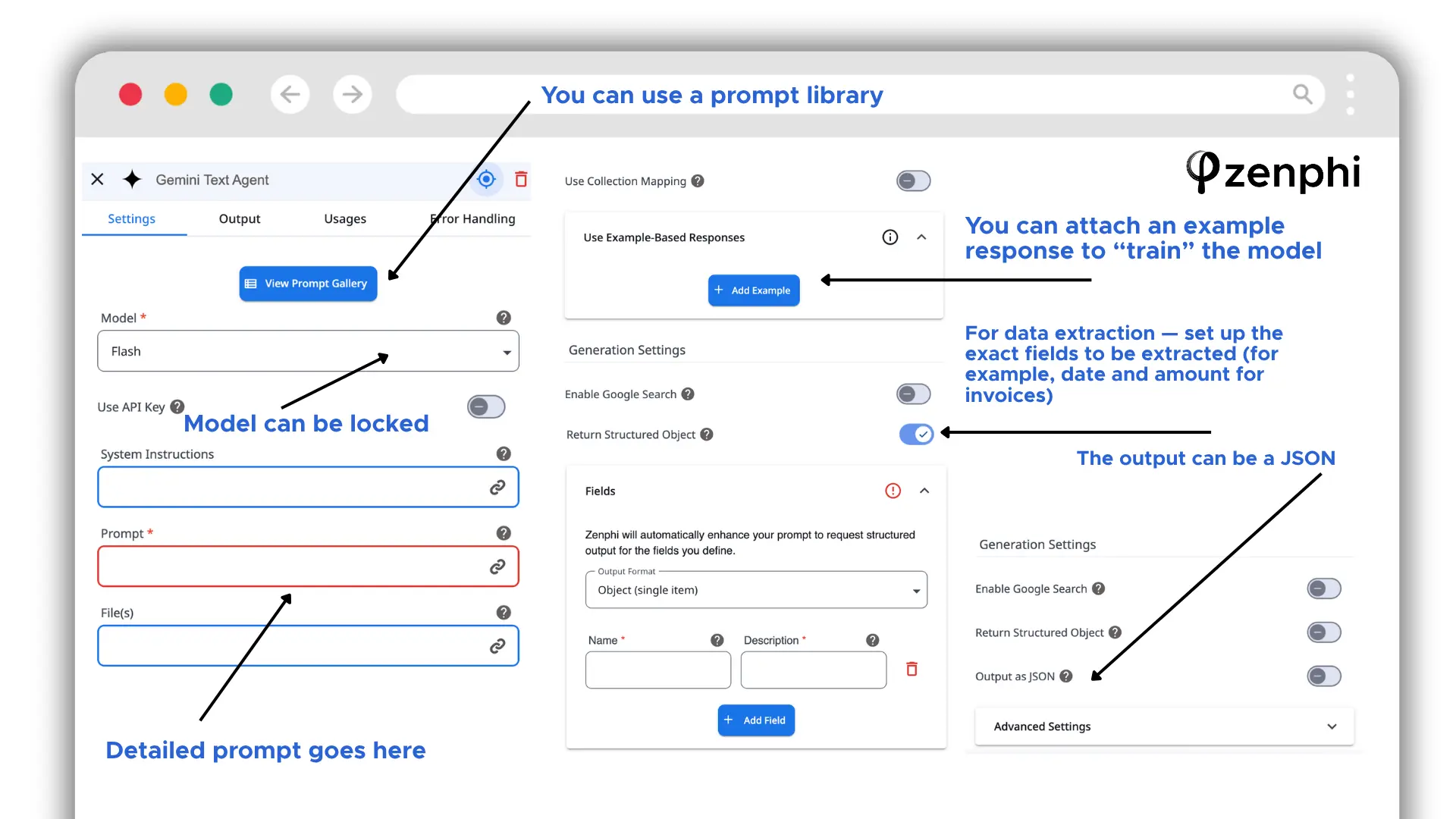
Bring your own model
Connect your own account with an AI provider, or a custom model of your choice. Inference is billed by that provider directly, on rates you hold and can negotiate.
First-class actions for major providers
Gemini, OpenAI and Claude agents are available as native workflow actions, configured like any other step — not as a generic HTTP call or a custom connector requiring maintenance.
Central control over model and instructions
The model can be locked at the organisation level, so workflow builders cannot change which provider or model a process uses. System instructions can be set once and locked rather than configured per workflow, which keeps behaviour consistent across everyone building.
Configuration that reduces consumption
Each AI action supports a prompt library, example-based responses to guide the model's output, structured field definitions for extraction — naming the exact fields to pull, such as date and amount from an invoice — and structured or JSON output. Defining the output narrowly reduces the tokens consumed per run and removes the parsing step afterwards.
Usage visibility and limits
AI consumption is tracked and limits are set inside Zenphi, so the spend is visible per workflow rather than arriving as an aggregate at the end of the month.
What this means for cost
| AI capability / control | Workato | Zenphi |
|---|---|---|
| Agentic AI and MCP | A stated focus; implementation direction unclear | — |
| Copilot maturity | Among the strongest in enterprise iPaaS | — |
| Bring your own AI provider account | Not publicly documented | Yes |
| Custom or self-hosted model | Not publicly documented | Yes |
| Native actions for Gemini, OpenAI, Claude | Not publicly documented | Yes, first-class actions |
| Who bills for inference | Not publicly documented | Your AI provider, directly |
| Model locked centrally | Not publicly documented | Yes |
| System instructions locked centrally | Not publicly documented | Yes |
| Usage limits set in-platform | Not publicly documented | Yes |
| Per-workflow consumption visibility | Not publicly documented | Yes |
The first two rows are Workato's, and they are real strengths. The rest are unanswered because Workato does not document them publicly — which is the distinction that matters at budget time.
How often the model is called
An agentic loop invokes the model at every decision point, with accumulated context, so consumption grows faster than the number of steps. A workflow that calls the model only where judgment is required consumes a fraction of that for the same process.
Who bills for the inference
Where AI runs on your own provider account, AI spend is separable from platform spend, visible on a bill you control, and negotiable with the provider. Where it runs through the platform's own metering, the two move together and the rate is the vendor's to set.
A platform can be favourable on one and unfavourable on the other. Both are worth establishing before signing.
How Workato pricing compares to Power Automate
Power Automate takes the opposite approach: published list pricing, and a licensing model built around users and bots rather than recipes.
Cloud flows using standard connectors only
Per user per month, unlocking premium connectors and attended RPA
Per bot per month, licensing the automation rather than the users
Per bot per month, adding a Microsoft-hosted virtual machine
| Pricing dimension | Workato | Power Automate |
|---|---|---|
| Published pricing | None | Yes, all tiers |
| Typical enterprise annual cost | $27,000 – $150,000+ (reported) | Varies with user and bot count |
| Unit of pricing | Recipe | User or bot |
| Cost of a widely-shared workflow | Flat, regardless of users | Per user, unless licensed per bot |
| Cost of many small automations | Scales with recipe count | Scales with users or bots |
| Premium connector surcharge | Connection-based | Requires Premium or Process licensing |
| Entry point | Enterprise commitment | Included with existing M365 licences |
| Expertise required | Platform specialists | Lower, though governance at scale is difficult |
Power Automate is materially cheaper to start with, particularly where Microsoft 365 licensing already covers standard connector flows. It becomes expensive along a different axis — per-user licensing on shared workflows, and the layering of Power Apps and Dataverse when a process needs forms and structured data.
Workato is more capable at genuine integration and more predictable once the recipe count is stable. Power Automate is cheaper to begin and harder to govern as the estate grows.
Teams running Google Workspace rather than Microsoft 365 face a different question entirely, since Power Automate's Google support is connector-based and shallow. That comparison is covered in Zenphi as the Power Automate equivalent for Google.
How Workato pricing compares to Zenphi
Zenphi prices by workflow and operation volume rather than by user or by recipe tier. For organizations whose automation centres on Google Workspace, that changes the economics in three ways.
Cost does not scale with headcount
A workflow used by the whole company costs the same as one used by a team. This matches Workato's recipe model rather than Power Automate's per-user model — with the difference that the entry point is not an enterprise commitment.
Small automations are economic
The pattern that penalises buyers under recipe-based pricing — many modest workflows rather than a few large integrations — is the pattern Zenphi is priced for. That matters because most organizations discover their automation need is shaped that way only after they start.
Platform expertise is not a prerequisite
Workflows are built and maintained by the IT team rather than by integration specialists, which removes the largest off-invoice cost in the Workato model.
| Pricing / capability | Workato | Zenphi |
|---|---|---|
| Entry point | ~$79/month on credit tiers (reported) | $300 per workflow annually |
| Typical enterprise annual cost | $27,000 – $150,000+ (reported) | $26,000 — $100,000 |
| Published pricing | None | Explained on the first call |
| Unit of pricing | Recipe and connection | Workflow and operation |
| Scales with headcount | No | No |
| Many small automations | Expensive per recipe | Economic |
| Google Workspace depth | Connector-level | Native, full Admin API |
| Microsoft 365 support | Connector-level | First-class Entra ID, SharePoint, Teams, Outlook, OneDrive actions |
| Expertise required | Platform specialists | IT team |
| Enterprise integration at scale | Built for it | Not built for it |
Integrating many enterprise systems with complex data transformation, high-throughput data pipelines, or B2B and EDI requirements. Zenphi is not an enterprise iPaaS and does not compete for that work.
Organizations whose automation centres on Google Workspace, including those with Microsoft systems still in the estate, and particularly those running many workflows rather than a few large integrations.
The full capability comparison, with user reviews for each platform, is in Workato alternatives: 11 competitors compared.
If Workato's quote doesn't match the shape of your automation, compare the workload — not just the licence.
If your environment has many workflows rather than a few, concentrated in Google Workspace rather than spread across enterprise systems, the economics may work out differently on a platform priced for that pattern. Bring us one process your team currently handles manually and we will build it with you in 30 minutes, then scope what the full workload would cost. You keep the workflow either way.


